
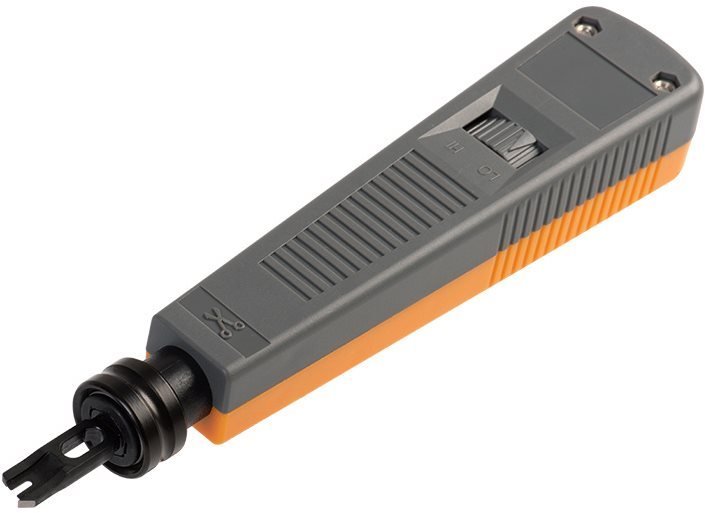

Vention Punch Down Impact Tool With Two Blade
The Vention Punch Down Impact Tool with Two Blade simplifies network cable termination for students learning IT infrastructure and professionals installing Ethernet connections in offices or homes. This hand-operated tool seats wires into keystone jacks, patch panels, and 110 blocks with a single impact motion, eliminating the tedious wire-by-wire insertion that hand tools require. The dual-blade design accommodates both 110 and Krone termination standards, making it suitable for diverse networking environments without carrying multiple specialized tools.
Key Features & Benefits
- Dual-Blade Compatibility: Switch between 110-style and Krone-style blades to terminate different connection types—110 for North American keystones and patch panels, Krone for European telecommunications equipment—without purchasing separate tools
- Impact-Action Termination: The spring-loaded mechanism seats and trims wires simultaneously with one firm push, completing connections in 2-3 seconds compared to 30+ seconds with manual insertion tools
- Adjustable Impact Force: Control punch-down pressure using the high/low adjustment setting, preventing damaged wires in delicate keystones while providing sufficient force for dense patch panel terminations
- Reversible Blade Storage: Store the unused blade inside the handle when not in use, preventing loss and keeping both blade types readily available for mixed termination projects
- Ergonomic Grip Design: The cushioned handle reduces hand fatigue during repetitive terminations, allowing comfortable installation of 20-50 connections without discomfort or reduced accuracy
Technical Specifications
Tool Specifications
- Tool Type: Spring-loaded impact punch down tool
- Blade Types: 110-style and Krone-style (both included)
- Impact Settings: High and low force adjustment
- Cutting Action: Cuts excess wire during punch down
- Wire Compatibility: 22-26 AWG solid copper network cable
Blade Specifications
- 110 Blade: For terminating 110-style keystones, patch panels, and blocks
- Krone Blade: For terminating Krone-style European connectors
- Blade Material: Hardened steel
- Blade Replacement: Replaceable blades (sold separately when worn)
- Cutting Edge: Precision-ground for clean wire cuts
Physical Specifications
- Overall Length: Approximately 160-180mm
- Weight: 150-180g
- Handle Material: Impact-resistant plastic with rubber grip
- Body Construction: Metal internal spring mechanism
- Color: Typically black with colored accent (varies by model)
Compatibility
- Cable Types: Cat5e, Cat6, Cat6a, Cat7 solid conductor cables
- Connector Types: RJ45 keystones, patch panels, 110 blocks, Krone blocks
- Wire Gauge: 22AWG, 23AWG, 24AWG, 26AWG solid copper
- Standards: TIA/EIA-568-A/B wiring schemes
Adjustment & Control
- Force Settings: High/Low impact adjustment dial or switch
- Blade Selection: Tool-free blade swapping mechanism
- Impact Trigger: Single-action spring release
- Safety Lock: Prevents accidental discharge when stored
Environmental
- Operating Temperature: -10°C to 50°C (14°F to 122°F)
- Storage: Room temperature, dry environment
- Durability: Rated for 10,000+ terminations before blade replacement
- Maintenance: Periodic cleaning and lubrication recommended
Use Cases & Applications
For Students
Information technology and networking students learn cable termination as a fundamental skill in certification programs like CompTIA Network+, Cisco CCNA, or vocational technical courses. The Vention punch down tool enables hands-on practice terminating keystone jacks and patch panels in campus labs, providing experience with professional-grade equipment before entering the workforce.
Students installing networks in off-campus apartments or shared houses benefit from this tool when running Ethernet drops to multiple rooms. Terminate wall-mounted keystone jacks professionally rather than leaving exposed cable ends dangling from walls, creating clean installations that landlords appreciate and that function reliably for online classes and gaming.
Technology club projects and hackathons often involve setting up temporary network infrastructure for events. The punch down tool speeds installation of structured cabling systems connecting dozens of workstations, reducing setup time from hours to minutes compared to crimping individual cable ends.
For Business Professionals
IT administrators and network technicians installing office network infrastructure use punch down tools daily when terminating cables in server rooms, wiring closets, and at desk locations. The Vention tool’s dual-blade design proves valuable in corporate environments with mixed equipment—110-style patch panels in North American offices alongside Krone-style equipment in European subsidiaries.
Small business owners and office managers establishing new workspaces save installation costs by running network cables themselves rather than hiring contractors for simple terminations. The tool enables professional-looking installations in conference rooms, cubicle areas, and office suites without specialized training beyond online tutorials.
Building managers maintaining commercial properties use punch down tools for ongoing network maintenance—replacing damaged keystones, adding new drops for tenant improvements, or reorganizing patch panel connections during office reconfigurations. The tool pays for itself after terminating just 10-15 connections compared to contractor service call fees.
General Applications
- Home Network Installation: Terminate keystone jacks for structured wiring systems providing Ethernet to bedrooms, home offices, and entertainment centers
- Smart Home Wiring: Install network infrastructure supporting IP cameras, smart thermostats, and whole-home automation systems requiring reliable wired connections
- Server Room Organization: Terminate patch panels organizing cable runs from network switches to server racks, creating manageable, labeled cable infrastructure
- Telecommunications Equipment: Connect phone systems and VoIP equipment to 110 blocks or Krone strips in telecom closets
- Commercial AV Installations: Wire conference rooms, classrooms, and auditoriums with network connections for displays, control systems, and streaming equipment
- Industrial Networks: Install Ethernet infrastructure in manufacturing facilities connecting programmable logic controllers, HMIs, and industrial computers
- Educational Facilities: Maintain campus network infrastructure across classrooms, labs, libraries, and administrative buildings
- Data Center Management: Organize high-density patch panel terminations efficiently in colocation facilities and enterprise data centers
How to Use the Punch Down Tool: Begin by stripping 2-3 inches of cable jacket to expose the four twisted pairs. Untwist each pair only as much as necessary (typically 0.5 inches) to seat wires into the keystone jack or patch panel following T568A or T568B wiring standards. Insert each wire into the appropriate slot on the connector, ensuring wires seat fully into the channels.
Position the punch down tool blade over the wire at a slight angle—typically 45 degrees for 110-style terminations. Apply firm downward pressure until the spring mechanism releases with an audible click. The impact action simultaneously pushes the wire into the insulation displacement connector (IDC) slot and cuts the excess wire extending beyond the connector.
Repeat for all eight wires, working systematically through the color-coded sequence. After completing all terminations, visually inspect connections to verify each wire seated properly and no loose strands remain. Test completed keystones or patch panel connections using a cable tester to verify proper wiring and connectivity.
Blade Selection and Installation: The 110-style blade features a narrower profile designed for the closely-spaced contacts in modern keystone jacks and patch panels common in North American installations. This blade type terminates most residential and commercial Ethernet connections students and professionals encounter.
The Krone-style blade accommodates wider spacing found in European telecommunications equipment and some older installations. Select this blade when working with Krone LSA-Plus connectors, certain telecom blocks, or equipment manufactured to European standards.
To change blades, remove the blade storage cap from the tool handle, extract the currently installed blade by pulling it straight out from the tool head, insert the desired blade until it clicks into place, and store the unused blade in the handle compartment for safekeeping.
Adjusting Impact Force: The high/low force adjustment prevents damage to delicate keystones while providing adequate force for dense patch panel terminations. Set the tool to low force when terminating individual keystone jacks, especially plastic-bodied keystones that can crack under excessive pressure.
Switch to high force when terminating 110 blocks or high-density patch panels where multiple wire layers and thick plastic bodies require stronger impact to seat wires completely. Dense 48-port patch panels particularly benefit from high force settings ensuring reliable connections in compact spaces.
Experiment with force settings on scrap keystones before terminating production cables. Properly adjusted tools seat wires fully into IDC slots without cracking plastic bodies or damaging conductor insulation—key indicators of appropriate force selection.
Wire Preparation Best Practices: Maintain twisted pair geometry as close to termination points as possible. Excessive untwisting (more than 0.5 inches) degrades signal quality, causing crosstalk and failing certification tests on Cat6 or Cat6a installations. Untwist only enough to spread individual conductors into their respective slots.
Strip cable jackets carefully using dedicated cable strippers rather than knives to avoid nicking conductor insulation. Damaged insulation creates signal quality issues and potential short circuits. Inspect exposed conductors before termination, re-stripping cables showing any insulation damage.
Arrange wires in the correct color sequence before beginning punch-down operations. Working systematically from left to right or following the labeled color codes on keystones prevents wiring mistakes requiring complete re-termination. Double-check wire positions before impacting—removing improperly seated wires damages both the wire and the connector.
Maintenance and Care: Clean the punch down tool blade periodically by wiping it with isopropyl alcohol to remove accumulated wire insulation, oxidation, and debris. Dirty blades produce inconsistent cuts, leaving wire stubs that can cause connection issues or fail certification tests.
Lubricate the spring mechanism annually using light machine oil if the tool feels stiff or the impact action becomes inconsistent. Apply 1-2 drops of oil to the spring cavity, work the mechanism several times to distribute lubricant, then wipe away excess oil to prevent attracting dust.
Replace blades when cutting performance degrades—indicated by incomplete wire cuts leaving “tails” on terminated connections or requiring multiple impacts to seat wires properly. Worn blades also increase the force required for successful terminations, accelerating hand fatigue during large projects.
Safety Considerations: The spring-loaded impact mechanism stores significant force. Keep fingers clear of the blade area when pressing down to prevent pinching injuries. Always orient the tool away from your face and body when triggering the impact action in case a wire fragment ejects during cutting.
Store the tool with the safety lock engaged (if equipped) to prevent accidental discharge if dropped. Keep the tool in a dedicated toolbox or case rather than loose in bags where the blade could damage other equipment or cause injury during retrieval.
Wear safety glasses when terminating cables in ceiling spaces, under desks, or anywhere wire fragments might fall toward your face. The trimmed wire ends can become projectiles during the impact action, particularly when working overhead.
Learning Resources: Numerous online tutorials demonstrate proper punch down techniques for beginners. Practice on inexpensive Cat5e keystones before attempting Cat6 or Cat6a terminations requiring tighter specifications. Many hardware stores and online retailers sell practice keystone kits specifically for learning termination skills.
Understanding T568A and T568B wiring standards proves essential before beginning terminations. While both standards work reliably, maintaining consistency throughout installations prevents connectivity issues. T568B dominates commercial installations in North America, while T568A sees use in some government and residential applications.
Consider investing in a cable tester alongside the punch down tool. Cable testers verify proper wiring, detect crossed pairs, and identify connection failures immediately after termination, preventing troubleshooting nightmares after walls are closed or cable runs are bundled.
Cost-Benefit Analysis: Professional punch down tools from premium brands cost $50-$150, while the Vention tool provides comparable functionality at lower price points suitable for students, homeowners, and small business installations. The tool pays for itself after terminating approximately 10-15 keystones compared to purchasing pre-made cables or hiring installers.
For occasional home use—terminating 5-10 keystones during a renovation or home office setup—this tool proves far more economical than hiring contractors charging $20-$50 per termination. For professional installers terminating hundreds of connections monthly, the tool represents a trivial investment given the time savings compared to manual termination methods.
When This Tool Excels: The Vention Punch Down Impact Tool suits anyone installing structured network cabling requiring more than 3-4 terminations. Students learning networking fundamentals, IT professionals maintaining corporate infrastructure, homeowners establishing whole-house networks, and small business owners setting up office LANs all benefit from the speed, consistency, and professional results this tool enables.
For single-connection repairs or extremely infrequent terminations, less expensive manual insertion tools may suffice despite slower operation. However, for installations involving multiple drops, patch panel organization, or ongoing network maintenance, the investment in an impact punch down tool dramatically improves efficiency and result quality compared to manual alternatives.


Reviews
There are no reviews yet.