
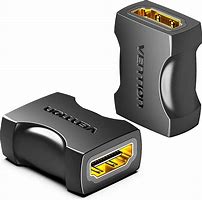
Vention HDMI Female to Female Coupler Adapter Black(AIRB0)
AIRB0 Vention HDMI Female to Female Coupler Adapter Black
Key Features;
- Connectors: HDMI female
- Gold-tipped connector endings
- Colour: black
- Terminals: straight
- Standard: HDMI 1.4
KSh599.00 KSh650.00 EX-VAT
Vention HDMI Female to Female Coupler Adapter Black (AIRB0)
The Vention AIRB0 is an HDMI female to female coupler adapter that connects two HDMI cables together for extended reach. This compact adapter enables students to extend existing HDMI cables when connecting devices across dorm rooms and study spaces, while business professionals can join cables for longer conference room connections without purchasing new cables. The inline coupler design provides a simple solution for extending HDMI connections when standard cable lengths prove insufficient.
Key Features & Benefits
- Cable Extension Capability: Connects two HDMI cables together to create longer runs, solving distance challenges without investing in new extended-length cables or dealing with cable waste.
- Female-to-Female Configuration: Accepts standard HDMI male plugs on both ends, allowing any two HDMI cables to be joined seamlessly for flexible length combinations.
- Compact Inline Design: Small form factor adds minimal bulk to cable connections, easily hiding behind furniture or in cable management systems without creating visible clutter.
- Gold-Plated Contacts: Provides corrosion-resistant connections that maintain signal integrity through the coupling point, ensuring reliable video and audio transmission.
- Plug-and-Play Simplicity: Works immediately without power requirements or configuration, enabling quick cable extensions for presentations, installations, and entertainment setups.
Technical Specifications
Physical Characteristics
- Connector Type: HDMI Type-A Female on both ends
- Pin Configuration: 19-pin HDMI standard (both ports)
- Form Factor: Compact inline coupler/adapter
- Housing Material: ABS plastic construction
- Color: Black
- Dimensions: Compact profile (typically 30-40mm length)
- Weight: Lightweight (approximately 10-15g)
Signal Support
- Maximum Resolution: Supports up to 4K@60Hz (dependent on cable quality)
- Standard Resolutions: 1080p@60Hz, 2K, 720p
- HDMI Standards: Compatible with HDMI 2.0, 1.4, 1.3 signals
- 3D Support: Yes, passes through 3D signals
- HDR Support: Yes, compatible with HDR content
- Bandwidth: Maintains source cable bandwidth capabilities
Audio & Video
- Video: Full HD and 4K video pass-through
- Audio: Digital audio pass-through (stereo and multichannel)
- ARC Support: Audio Return Channel compatible
- CEC Support: Consumer Electronics Control pass-through
- Color Depth: Up to 48-bit Deep Color support
Connector Features
- Contact Plating: Gold-plated pins resist corrosion
- Pin Contact: 19 pins on each female connector
- Grip: Standard HDMI friction fit
- Shielding: Metal shell for EMI/RFI protection
- Durability: Rated for multiple insertion cycles
Signal Quality
- Signal Loss: Minimal when using quality cables
- Shielding: Maintains cable shielding integrity
- Impedance: Matched to HDMI standard (100 ohms differential)
- Bandwidth Preservation: Maintains cable specifications when properly matched
Compatibility
- Cable Types: Standard HDMI cables (Type-A male connectors)
- Devices: All HDMI-equipped devices (TVs, monitors, projectors, computers, gaming consoles, streaming devices, Blu-ray players)
- HDCP: Maintains copy protection compatibility
- Bi-Directional: Works with all HDMI signal directions
Installation Considerations
- Total Length: Signal quality depends on combined cable length
- Cable Quality: Use matched quality cables for best results
- Maximum Recommended: Keep total combined length under 15-20m for 1080p, under 10m for 4K
- Cable Gauge: Thicker cables recommended for longer total distances
Important Notes
- Passive Coupler: No signal amplification or regeneration
- Cable Dependency: Performance limited by weakest cable in chain
- Not Recommended: Multiple couplers in series may degrade signal
- Length Limits: Very long total distances may require active equipment
Use Cases & Applications
For Students The Vention AIRB0 coupler allows students to connect existing short HDMI cables when dorm room furniture arrangement places laptops farther from TVs than anticipated. Students in shared apartments use the coupler to combine cables for connecting gaming consoles to TVs positioned across living rooms without purchasing new long cables. The compact adapter travels easily in laptop bags for presentations in various campus facilities where available HDMI cables prove too short for comfortable setup. Students organizing movie nights in common areas join cables to reach projectors or displays from comfortable seating distances.
For Business Use Business professionals use the coupler during presentations when conference room HDMI cables don’t quite reach presentation tables, quickly solving connectivity issues without IT intervention. Office workers extending desktop computer connections to monitors positioned at ergonomic distances join existing cables rather than routing new ones. IT departments keep couplers in stock for quick fixes when installed cables prove slightly short during workstation reconfigurations. Small businesses avoid cable replacement costs by extending existing functional cables to accommodate office layout changes. Traveling professionals carry compact couplers as emergency connectivity solutions when hotel or client office HDMI cables prove inadequate.
Additional Applications Home theater enthusiasts extend HDMI connections between entertainment centers and wall-mounted TVs when initial cable estimates prove short during installation. Gamers position consoles at comfortable distances from displays by joining cables without fishing new long cables through walls or furniture. Content creators extend connections between cameras, capture devices, and monitors in studio setups where equipment repositioning requires additional reach. Digital signage installers extend cables to displays during installations when pre-measured cables fall slightly short of final mounting positions. Event setup crews quickly adapt to venue-specific requirements by joining available cables rather than carrying extensive cable inventory. Retail stores extend digital signage connections to displays during floor reconfigurations without rewiring entire systems. Conference room AV installers use couplers as temporary solutions during equipment upgrades while permanent cabling gets updated. Home office workers accommodate desk repositioning by extending monitor connections without purchasing new cables for minor distance changes. Photographers and videographers extend camera-to-monitor connections in studio environments where equipment positions shift between shoots. Museums and galleries extend multimedia display connections during exhibit installations when artwork placement dictates different cable lengths than originally planned. The coupler proves particularly valuable in rental properties and temporary installations where permanent cable runs aren’t practical or permitted. Educational institutions extend classroom technology connections during furniture rearrangements without facilities department involvement. Performance venues extend stage equipment connections to front-of-house displays by joining existing cable inventory. Trade show exhibitors adapt booth configurations by extending display connections without specialized cable orders. However, users should note that each connection point potentially introduces signal degradation, so the coupler works best for modest extensions with quality cables rather than creating extremely long runs that might benefit from active signal boosters or higher-specification cables.
Based on 0 reviews
Be the first to review “Vention HDMI Female to Female Coupler Adapter Black(AIRB0)”
Related products
-
Vention Accessories, Vention USB
Vention Multi-function USB-C to HDMI/USB-C Docking Station 0.15m
-8% Vention Accessories, Vention USB
Vention Multi-function USB-C to HDMI/USB-C Docking Station 0.15m
Multi-function USB-C to HDMI/USB-C Docking Station 0.15m
Key features;
- Brand: Vention
- Name: Multi-function USB-C to HDMI+USB-C Gen
- 1+USB3.0+USB2.0*2+RJ45+SD+TF+PD Docking Station Mirrored Surface Type
- Model: TFHHB
- Interface Technics: Nickel-plated
- Transmission Speed: 5Gbps(Type-C Gen 1)/5Gbps(USB 3.0)/480Mbps(USB 2.0)
- Network Speed: 10/100/1000Mbps
- Resolution: 4K@60Hz
- Rated Input: 100W
- Conductor: Tinned-copper
- Shell: Aluminum Alloy + Acrylic
- Compatible Memory: CardMicro SD/Micro SDHC/Micro SDXC/SDHC/SDXC
- Card Slot: 2.0 SD 2-LUN (Dual card simultaneous read)
- Memory Card Capacity: 265G
- Shielding: Aluminum Foil + Metal Braided
- Jacket: TPE
- AWG: 26+34AWG
- OD: 4.2mm
- Length: 0.15m
SKU: n/a -
Vention Accessories, Vention HDMI
Vention HDMI Cable 15M Black – AAGBN
Vention HDMI Cable 15M Black – AAGBN
- Cable Length: 15 meters
- Color: Black
- Connector Type: HDMI (male to male)
- Resolution Support: Up to 4K UHD at 30Hz (supports 1080p, 1440p, and 4K resolutions)
- Bandwidth: 10.2 Gbps
- Connector Material: Gold-plated connectors for enhanced signal transfer and corrosion resistance
- Cable Construction: Nylon braided jacket for durability and protection against physical damage
- Audio Return Channel (ARC): Supports ARC functionality for easier audio management between TV and external audio devices
- Backward Compatibility: Compatible with HDMI 1.4 and HDMI 2.0 devices
- Signal Transfer: High-quality transmission with minimal signal loss
- Supports: Ethernet, 3D video, and deep color (12-bit)
- Certifications: Certified for High Speed HDMI
SKU: n/a -
-
Vention Accessories, Vention HDMI
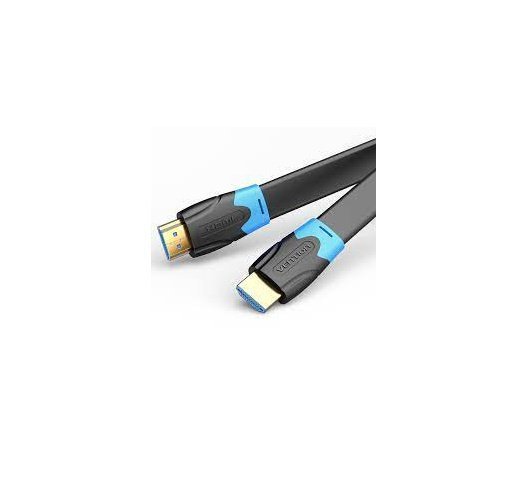
VENTION FLAT HDMI CABLE 2M BLACK
VENTION FLAT HDMI CABLE 2M BLACK
Key Features;
- High-Speed HDMI 2.0 Cable
- Mirror & Extended Mode
- Long-Last HDMI 2.0 Cable
- Connector Type: HDMI Male A
- Gold plated connectors
- Shield Anti-interference
- PVC body: resistance to bending
SKU: n/a


There are no reviews yet.