
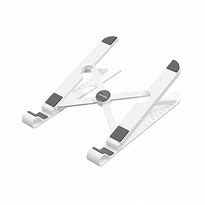
Vention Laptop Stand White (KDNW0 )
KDNW0 Vention Laptop Stand White
Key Features;
- Laptop support up to 17.3′
- 9 adjustable heights
- Portable and light weight
- silicone pad
- Anti-slip
- White color
KSh1,100.00 KSh1,400.00 EX-VAT
Vention Laptop Stand White (KDNW0)
The Vention KDNW0 is an adjustable laptop stand designed to elevate devices for improved ergonomics and cooling. This stand enables students to achieve comfortable viewing angles during long study sessions while reducing neck strain, and business professionals can create ergonomic workstation setups that promote better posture throughout workdays. The white finish provides a clean, modern aesthetic that complements contemporary workspace designs.
Key Features & Benefits
- Adjustable Height and Angle: Offers multiple elevation positions to align laptop screens with eye level, reducing neck and shoulder strain during extended work sessions and promoting healthier posture.
- Enhanced Cooling Ventilation: Elevates laptops off desk surfaces to improve airflow around the device, helping prevent overheating during intensive tasks like video editing, gaming, and data processing.
- Stable Non-Slip Design: Features rubber pads and grips that keep laptops securely in place while preventing the stand from sliding on desk surfaces during typing and regular use.
- Compact Foldable Construction: Collapses to a slim profile for easy transport in laptop bags and backpacks, making it ideal for students and professionals who work in multiple locations.
- Universal Laptop Compatibility: Accommodates laptops from 10 to 17 inches, supporting MacBooks, ThinkPads, Dell XPS, HP, and other brands without size restrictions.
Technical Specifications
Physical Characteristics
- Color: White
- Material: Aluminum alloy or ABS plastic construction (depending on model variant)
- Design: Adjustable elevation stand with open design
- Folded Dimensions: Compact flat profile for portability
- Weight: Lightweight construction (typically 200-400g)
- Surface Protection: Rubber or silicone pads on contact points
Adjustability
- Height Range: Multiple adjustable positions (typical range 2-6 inches elevation)
- Angle Adjustment: Variable tilt angles for optimal screen positioning
- Locking Mechanism: Secure position holds for stability during use
- Configuration: Tool-free adjustment for quick setup changes
Stability Features
- Base Design: Wide footprint for stable support
- Anti-Slip Pads: Rubber feet prevent desk surface sliding
- Device Grips: Silicone or rubber pads secure laptop in position
- Weight Capacity: Supports laptops up to approximately 5-8kg
Ventilation Design
- Open Architecture: Promotes airflow around laptop bottom
- Heat Dissipation: Metal construction aids cooling (if aluminum variant)
- Spacing: Elevates device away from desk surface for air circulation
Compatibility
- Laptop Sizes: 10″ to 17″ screens
- Supported Devices: MacBook Air/Pro, Dell XPS, HP Pavilion/Spectre, Lenovo ThinkPad/IdeaPad, ASUS, Acer, Surface Laptop, Chromebooks
- Weight Range: Accommodates standard consumer laptops
- Tablet Use: May support larger tablets (iPad Pro, Surface Pro) depending on size
Portability
- Foldable Design: Collapses for transport and storage
- Travel-Friendly: Fits in laptop bags and backpacks
- Setup Time: Quick assembly without tools
Use Cases & Applications
For Students The Vention KDNW0 laptop stand helps students maintain proper posture during extended study sessions in dorm rooms and libraries by elevating screens to eye level. Students attending lectures can use the stand to position laptops at comfortable viewing angles while taking notes, reducing neck strain during long classes. The foldable design allows students to carry the stand between classes, study groups, and coffee shops for consistent ergonomic setup wherever they work. Students living in shared dormitories appreciate the improved cooling that prevents laptop overheating during intensive tasks like running simulations, video rendering, and gaming between study sessions.
For Business Use Business professionals create ergonomic home office and workplace setups using the stand to position laptops at proper eye level, reducing repetitive strain from poor posture during full workdays. Remote workers benefit from the ability to transform any space into a comfortable workspace by simply deploying the portable stand at kitchen tables, coffee shops, or coworking spaces. The white finish suits professional environments, maintaining clean aesthetics on office desks and during video conferences where workspace appearance matters. IT workers and developers use the elevated position to improve airflow during processor-intensive tasks like compiling code, running virtual machines, and rendering graphics.
Additional Applications Content creators use the laptop stand to position devices at optimal angles for video editing, photo retouching, and graphic design work, reducing fatigue during long creative sessions. Musicians and DJs elevate music production laptops for better screen visibility and equipment cooling during recording sessions and live performances. Photographers position laptops at comfortable viewing heights during photo culling and editing workflows in studios and on location. Home users create more comfortable workspaces for paying bills, online shopping, and personal projects by improving laptop ergonomics at kitchen tables and desks. Gamers use the stand to improve cooling performance during extended gaming sessions while achieving better viewing angles for competitive play. Educators and trainers position laptops at appropriate heights during online teaching sessions, webinars, and virtual presentations for comfortable extended speaking periods. Writers and journalists reduce neck strain during long writing sessions by elevating laptops to proper typing and viewing positions. The portable design proves valuable for consultants, freelancers, and traveling professionals who work from various locations including client offices, hotel rooms, and airport lounges, allowing them to maintain ergonomic consistency regardless of workspace. Dual-monitor setups benefit from the stand by elevating laptops to match external monitor heights, creating aligned viewing surfaces that reduce head movement and eye strain during multitasking workflows.
Based on 0 reviews
Be the first to review “Vention Laptop Stand White (KDNW0 )”
Related products
-
Vention Accessories, Vention HDMI
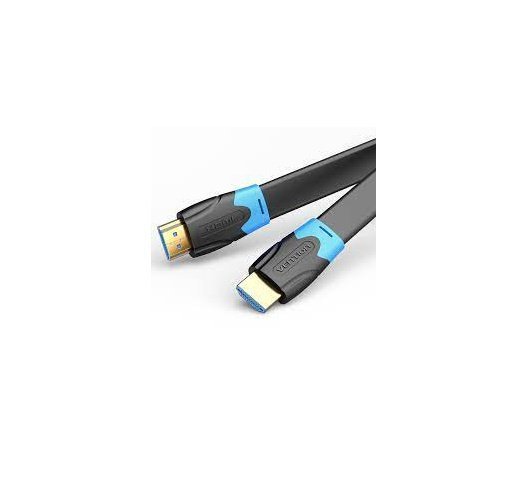
Vention Flat HDMI Cable 5M Black
Vention Flat HDMI Cable 5M Black
Key features;
- Type : Cables
- Compatible with : Computers – PCs
- Brand : Vention
- Size : 5 Meter
- HDMI A Male to A Male Cable: Supports Ethernet, 3D, 4K video and Audio Return Channel (ARC)
- Connects Blu-ray players, Apple TV, PS4, PS3, Xbox One, Xbox 360, computers and other HDMI-enabled devices to TVs, displays, A/V receivers and more
SKU: n/a -
Vention Accessories, Vention HDMI
VENTION FLAT HDMI CABLE 2M BLACK
VENTION FLAT HDMI CABLE 2M BLACK
Key Features;
- High-Speed HDMI 2.0 Cable
- Mirror & Extended Mode
- Long-Last HDMI 2.0 Cable
- Connector Type: HDMI Male A
- Gold plated connectors
- Shield Anti-interference
- PVC body: resistance to bending
SKU: n/a -
Vention Accessories, Vention USB
Vention Type C To Multi-function 10 in 1 Docking Station
Vention Type C To Multi-function 10 in 1 Docking Station
Key features;
- Type C to USB 3.0 (2 ports), USB 2.0 (2 ports), Gigabit Ethernet, VGA, HDMI, SD, TF Card Reader, Typer C PD
- With SD/TF slot, can read 2 cards simultaneously;
- Compatible with SDXC, SDHC, SD, Micro SDXC, Micro SD, Micro SDHC etc;
- PD port support fast charging
- The RJ45 port support 1000Mbps transmission rate
SKU: n/a -
Vention Accessories, Vention USB
Vention USB-C Multi-Functional 5 in 1 Docking Station
Vention USB-C Multi-Functional 5 in 1 Docking Station – VEN TGDHB
Key features;
- Model: VEN TGDHB
- Brand: Vention
- Type: USB-C Multi-Functional 5-in-1 Docking Station
- SD/MicroSD Card Slots: SD and MicroSD card readers for transferring data from memory cards
- Compatibility: USB-C devices, including laptops, tablets, and smartphones with compatible USB-C ports
- Power Delivery: Varies by model, check specific product details for supported charging rates
SKU: n/a -
Vention Accessories, Vention HDMI
Vention HDMI Cable 10M Black
Vention HDMI Cable 10M Black
- Model: VAA-B02-L1000
- Cable Type: HDMI
- Length: 10 meters (approximately 32.8 feet)
- Color: Typically black
- Connector Type: Standard HDMI connectors
- Flat Cable Design: Flat cable design can make it easier to manage and route cables, especially over long distances
- Resolution Support: Supports a range of resolutions, including Full HD (1080p) and possibly 4K depending on the cable version and device compatibility
- Refresh Rate: Typically supports high refresh rates for smooth video playback and gaming
- Audio Support: Typically supports both audio and video transmission
SKU: n/a



There are no reviews yet.