
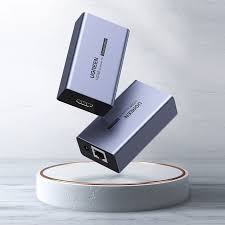
Ugreen HDMI Extender 70 Meters – CM455
Key Features:
- Support Network cable length: 70M cat5e and Cat6 (please choose standard pure copper network cable)
- Supports HDMI Input and Output cables up to 20M (26AWG pure copper cable)
- Support EDID technology to read and write, automatically optimize resolution.
- Supports EQ automatic adjustment technology, automatic optimization and sound balance.
- Convert HDMI signal to 70m long network cable
- Supports HDCP 1.4 and 3D projection.
- Maximum resolution: 1080P@60Hz
- Power supply: 5V 1A (option)
- Dimensions: L74xW26xH56 (mm)
KSh7,999.00 KSh9,500.00 EX-VAT
UGREEN HDMI Extender 70 Meters – CM455
The UGREEN HDMI Extender 70 Meters transmits high-definition video and audio signals up to 70 meters (230 feet) using a single Cat6 Ethernet cable. This two-unit transmission system enables students to connect presentation sources to distant auditorium displays or lecture hall projectors, while business professionals use it to route HDMI signals across conference centers, training facilities, and large office spaces without signal degradation. It’s an essential solution for any installation requiring long-distance HDMI connectivity beyond the limitations of standard HDMI cables.
Key Features & Benefits
- 70-Meter Extended Range: Transmits full HD signals up to 230 feet through standard Cat6/Cat6a/Cat7 Ethernet cables, eliminating the need for expensive fiber optic systems or signal repeaters in large spaces.
- 1080p Full HD Quality: Maintains pristine 1920×1080 resolution at 60Hz across the entire cable run, ensuring presentations, training videos, and digital signage display with crisp clarity and smooth motion.
- Plug-and-Play Installation: No software, drivers, or network configuration required—simply connect the transmitter and receiver units with an Ethernet cable, then plug in HDMI devices to establish instant signal transmission.
- Bi-Directional IR Control: Built-in infrared extension allows you to control source devices from the display location or vice versa, enabling remote operation of media players, presentation computers, or set-top boxes across long distances.
- Cost-Effective Infrastructure: Uses readily available and affordable Cat6 Ethernet cables instead of specialized long HDMI cables or fiber systems, significantly reducing installation and replacement costs.
Technical Specifications
Video Performance
- Maximum Resolution: 1920x1080p (Full HD) at 60Hz
- Supported Resolutions: 1080p, 1080i, 720p, 576p, 480p
- Maximum Transmission Distance: 70 meters (230 feet) with Cat6 or better
- HDMI Version: HDMI 1.3 compliant
- Color Depth: 24-bit (8-bit per channel)
- Video Format: RGB, YCbCr 4:4:4
Audio Support
- Audio Formats: LPCM, Dolby Digital, DTS
- Audio Channels: Up to 7.1 channel surround sound
- Audio Transmission: Embedded in HDMI signal (no separate audio cables required)
Connectivity & Cable Requirements
- Network Cable Required: Cat6, Cat6a, or Cat7 Ethernet cable (not included)
- Minimum Cable Standard: Cat6 for optimal 70-meter performance
- Cable Type: Standard straight-through wired Ethernet (not crossover)
- HDMI Connections: Standard Type A (19-pin) on both units
Infrared Extension
- IR Frequency: 30-60kHz
- IR Cable Length: 1.5 meters (included)
- IR Functionality: Bi-directional (control at either end)
- IR Components: 1x IR receiver eye, 1x IR emitter blaster
Package Contents
- 1x Transmitter Unit (TX) with HDMI input and RJ45 output
- 1x Receiver Unit (RX) with RJ45 input and HDMI output
- 2x 5V DC Power Adapters (UK plugs)
- 1x IR Extension Cable Set (receiver + emitter)
- 1x User Manual
Physical Design
- Dimensions (each unit): 78 x 57 x 23mm
- Weight (per unit): Approximately 95g
- Power Consumption: 5V/1A per unit (5W total system)
- Operating Temperature: 0°C to 50°C
- Storage Temperature: -20°C to 60°C
- Housing Material: Metal enclosure for heat dissipation and durability
- LED Indicators: Power and signal status lights on both units
Compatibility
- Source Devices: Laptops, desktop computers, Blu-ray players, gaming consoles (PS4/PS5, Xbox), cable boxes, streaming devices, media servers
- Display Devices: HDTVs, projectors, monitors, video walls with HDMI input
- Cable Infrastructure: Standard networking Ethernet cables (not PoE)
Standards & Certifications
- Compliance: CE, FCC, RoHS
- ESD Protection: Built-in electrostatic discharge protection
Use Cases & Applications
For Students and Educational Settings
Large lecture halls and auditoriums present significant challenges for HDMI connectivity. The UGREEN 70-meter extender solves the common problem where presentation laptops sit at instructor podiums while projectors mount on distant ceilings or rear walls. Students defending dissertations, presenting research findings, or delivering capstone projects can control presentations from the stage while displays serve audiences 50-70 meters away.
University auditoriums benefit from permanent installations where media control rooms sit separate from projection areas. Install the transmitter in the control booth alongside computers and media players, then route a single Cat6 cable to the receiver near the projector. This configuration protects expensive equipment while maintaining full HD quality for educational videos, lectures, and presentations.
Student organizations running events in multipurpose spaces use this extender for temporary installations. Set up presentation equipment in secure backstage areas or control positions while main displays serve audiences in performance spaces, conference rooms, or event halls. The IR extension allows technical operators to control playback remotely without disrupting events.
For Business Professionals
Corporate training centers and conference facilities frequently require displays positioned far from source equipment. The UGREEN extender enables clean, professional installations with computers and media players hidden in equipment closets, cable management systems, or locked cabinets. This reduces cable clutter, protects valuable equipment from theft or damage, and maintains professional aesthetics in client-facing spaces.
Large conference rooms and boardrooms benefit from flexible equipment placement. Position presentation laptops or media servers in convenient control areas—often at the conference table or in equipment racks—while screens mount on distant walls. The 70-meter range covers even expansive boardrooms and multi-purpose conference spaces common in modern office buildings.
Business training environments leverage the IR remote extension feature. Instructors control media playback from the front of training rooms while computers remain at secure control stations in the back or in adjacent equipment rooms. This arrangement prevents accidental disruption of presentation equipment while maintaining instructor mobility.
Commercial and Institutional Applications
Digital signage installations in retail environments, corporate lobbies, and public spaces benefit from centralized media player locations. Install a single media server in a back office or secure location, then distribute signals to multiple displays throughout facilities using extender pairs. This simplifies content updates and equipment maintenance while reducing theft risk.
Houses of worship use these extenders to connect control rooms to sanctuary displays and projection systems. Technical operators manage media presentations, lyrics, and sermon materials from sound booths or control areas while displays serve congregations in main worship spaces. The long-distance capability accommodates large sanctuaries and multi-room facilities.
Museums and exhibition spaces route video content from climate-controlled equipment rooms to displays in exhibition areas. This protects sensitive media equipment from environmental variations while maintaining high-quality video presentation for visitors.
Installation Planning and Considerations
Successful implementation requires planning cable routes between transmitter and receiver locations. Cat6 Ethernet cable handles the 70-meter maximum distance reliably, though Cat6a or Cat7 provides additional shielding beneficial in environments with significant electromagnetic interference. Purchase Ethernet cables separately based on your exact distance requirements—cables are typically available in pre-terminated lengths from 15 to 100 meters.
Both transmitter and receiver units require local power connections. Ensure power outlets exist at both equipment locations before installation, or plan for extension cords or power distribution systems. The included UK power adapters work with 230V mains voltage standard in the UK and Europe.
Use straight-through wired Ethernet cables, not crossover cables. Most modern Ethernet cables are straight-through by default, but verify cable type before purchasing for specialized installations. The extender does not support or require Power over Ethernet (PoE)—dedicated power adapters supply necessary power to each unit.
Cable Routing Best Practices
Route Ethernet cables through existing conduits, cable trays, or along baseboards to maintain professional appearances. Avoid running cables parallel to electrical wiring for extended distances, as this can introduce interference. When crossing electrical lines is necessary, do so at right angles to minimize potential interference.
Secure cables properly to prevent tripping hazards and accidental disconnection. Use cable ties, clips, or conduit appropriate for your installation environment. For permanent installations in commercial spaces, consider hiring professional installers familiar with local building codes and cable management requirements.
Label both ends of the Ethernet cable clearly during installation, noting which extender unit (TX or RX) each end connects to. This simplifies troubleshooting and future maintenance when multiple extender systems operate in the same facility.
IR Remote Control Setup
Connect the IR receiver eye near your display where it can receive signals from your remote control. Connect the IR emitter blaster near your source device’s IR sensor. This configuration allows you to operate source devices from the display location—particularly useful when media players or computers sit in distant equipment rooms.
The IR system also works in reverse: place the IR receiver near your source device and the emitter near your display to control displays from source equipment locations. Configure the system based on operational needs and which location requires remote control capability.
Performance Optimization
For maximum reliability at the full 70-meter distance, use Cat6 cable rated for 550MHz or Cat6a/Cat7 cables rated for even higher frequencies. While standard Cat6 works well, premium cables provide additional headroom that improves performance in electrically noisy environments or when cables route near interference sources.
Verify both HDMI cables (connecting your devices to the extender units) are high-quality cables capable of handling 1080p at 60Hz. The extender maintains signal quality excellently, but poor-quality HDMI patch cables at either end can introduce problems. Use certified high-speed HDMI cables for best results.
Monitor the LED indicators on both transmitter and receiver units during setup. Solid power lights indicate proper power connections, while signal lights confirm successful HDMI connection and data transmission. If signal lights don’t illuminate, verify all connections are secure and HDMI source devices are powered on and outputting video.
Troubleshooting Common Issues
If no video displays, verify the Ethernet cable is securely connected at both ends and that both power adapters are plugged in and functioning. Check that source devices output active HDMI signals—some laptops require manual activation of external display outputs through keyboard shortcuts or display settings.
For intermittent signal loss or flickering, inspect the Ethernet cable for damage, sharp bends, or pinch points that may affect internal conductors. Replace suspect cables with known good cables to isolate cable-related issues. Ensure cable routing avoids areas with strong electromagnetic interference from motors, generators, or heavy electrical equipment.
If IR remote control doesn’t function, verify IR cables connect properly to both transmitter and receiver units, with receiver eyes positioned to capture remote signals and emitter blasters positioned near device IR sensors. Some devices require close emitter placement directly over IR receivers for reliable operation.
Important Considerations
This HDMI extender reliably transmits standard video content for presentations, digital signage, training materials, and general media playback. The system supports HDCP (High-bandwidth Digital Content Protection) for most applications, though compatibility with certain protected streaming content varies by source device and content provider.
The 70-meter maximum distance assumes Cat6 or better cabling in good condition. Cable quality, electromagnetic environment, and installation practices all affect achievable distance. For installations approaching maximum distance, test the complete system before finalizing permanent installations to verify performance meets requirements.
The UGREEN HDMI Extender 70 Meters provides robust, cost-effective long-distance HDMI connectivity for educational institutions, businesses, and commercial installations. Students presenting in large venues and business professionals managing training facilities or conference centers gain reliable signal transmission without the expense of fiber optic systems or the limitations of standard HDMI cables.
Based on 0 reviews
Be the first to review “Ugreen HDMI Extender 70 Meters – CM455”
Related products
-
-
-
-
Ugreen Accessories
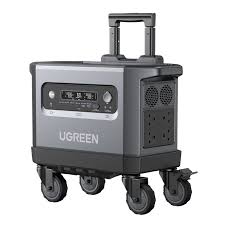
UGREEN PowerRoam Power Station 2048Wh 2300W UK-GS2200
FEATURES:
- 2200Wh Lithium Iron Phosphate (LiFePO4) batteries
- Powers Various Appliances and Devices
- UPS functionality with 20ms switchover
- Features 14 outlets – 4 AC Outlets(2200W Total), 4 USB Type-C Ports(140W, 100w, 2 x 45W), 2 USB Type-A Ports(22.5W Each), 2 Car/DC Outlets(120W Total), Anderson output 300W
- Recharge the battery from 0% to 100% within 1.5 hours
- System Management App proactively monitors and protects the Power Station
- Convenient 4-wheel trolley with adjustable handle
SPECIFICATIONS:
- Capacity: 2048Wh
- Cycle Life (80%): 3000
- Wi-Fi/Bluetooth/App Support: Yes
- Input Ports: AC(1800W) x 1, Solar Charging Port(1200W Max) x 2 (supports Car Charing 12/24V 8A Max)
- Output Ports: AC outlet 2200W x 4, USB Type-C x 1 (140W), USB Type-C x 1 (100W), USB Type-C x 2 (45W), USB-A x 2 (22.5W), Car Charger x 1, Anderson Output (300W) x1, DC5521 x 2
- Power Source: AC Powered (1.5 hours), Solar Powered (2.5 hours), Car Powered (24/12 hours)
- Display: 4.7 inch LCD
- Item Weight: 25000g
- Product Dimensions: 54 x 25 x 29 cm
FEATURED FUNCTIONS:
- Quiet Mode
- Energy-Saving Mode
- Child Safety Lock
- Battery Preservation Mode
ESTIMATED HOURS OF RUNTIME:
- Home Sound System (95W): 17.2 hrs
- 55″ LED TV (140W): 11.7 hrs
- Slow Cooker (250W): 6.6 hrs
- Desktop PC (300W): 5.5 hrs
- Double-Door Fridge (780W): 2.1 hrs
- Microwave (800W): 2.0hrs
- Electric Drill (850W): 1.9 hrs
- Washing Machine (800W): 1.9 hrs
WHAT’S IN THE BOX:
- Ugreen PowerRoam 2200 Portable Power Station x1
- PowerRoam Trolley x1
- AC Charging Cable x1
- Car Charging Cable x1
- Solar Parallel Adapter x1
- Accessory Bag x1
- User Manual x1
SKU: n/a -
Ugreen Accessories, Ugreen USB
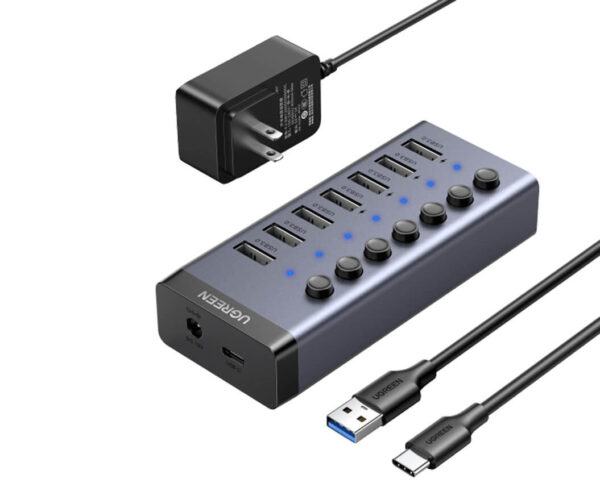
UGREEN 7-Port Powered USB 3.0 Hub – CM481
SKU 90305 Compatible Phone Models IPhone 14, 14 Plus, 14 Pro Max, 14 Pro,IPhone 13 Pro Max, iPhone 12 11 Pro Max, iPhone 12 Mini, iPhone XS XR X, Samsung Galaxy S22 Ultra, S22+, Galaxy Note20 Ultra,IPhone 13 Pro Max, iPhone 12 11 Pro Max, iPhone 12 Mini, iPhone XS XR X, Samsung Galaxy S22 Ultra, S22+, Galaxy Note20 Ultra, See more Compatible Devices Smartphones Recommended Uses For Product Tabletop, travel Special Feature Portable, Cut-out for cable, Foldable, Covered with silicone pads, Adjustable Product Dimensions 5.04 x 3.35 x 1.57 inches Item Weight 8.1 ounces SKU: n/a


There are no reviews yet.