
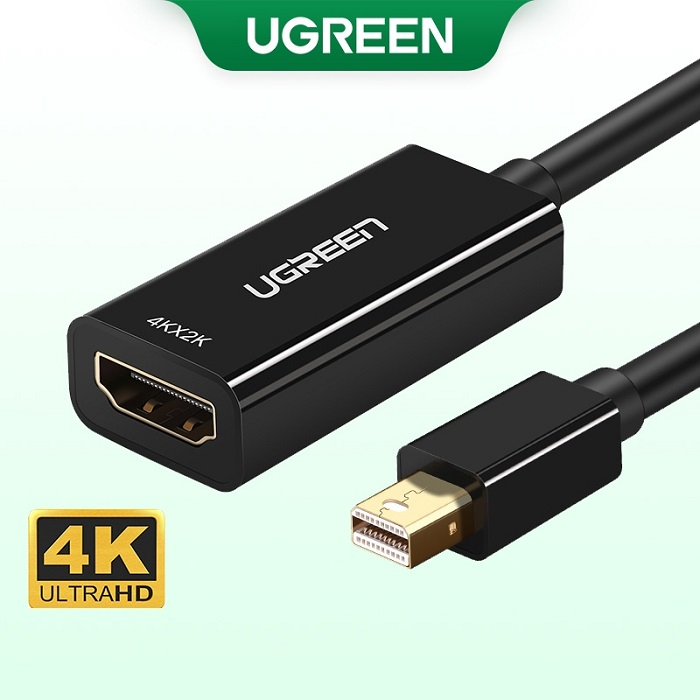
UGREEN Mini DisplayPort to HDMI Female Converter (4K) – MD112
UGREEN Mini DisplayPort to HDMI Female Converter (4K) – MD112
-
Input: Mini DisplayPort Male
-
Output: HDMI Female
-
Resolution Support: Up to 3840×2160 at 30Hz
-
Audio Support: Uncompressed audio such as LPCM
-
Cable Length: 25cm
-
Compatibility: Compatible with devices featuring a Mini DisplayPort or Thunderbolt 2 interface
KSh1,300.00 KSh1,650.00 EX-VAT
UGREEN Mini DisplayPort to HDMI Female Converter (4K) – MD112
The UGREEN MD112 is a compact adapter that converts Mini DisplayPort (Thunderbolt 2) output to standard HDMI input, supporting resolutions up to 4K at 30Hz. This active converter features gold-plated connectors and integrated audio pass-through, making it essential for students connecting MacBooks to modern displays and business professionals presenting from older Apple laptops on HDMI-equipped projectors. The lightweight design with an 8-inch cable eliminates the bulk of carrying separate dongles and HDMI cables.
Key Features & Benefits
- 4K Ultra HD Support: Transmits video at resolutions up to 3840×2160 at 30Hz, which means your presentations, design work, and video content display with four times the detail of standard 1080p on compatible 4K monitors and projectors.
- Integrated Audio Transfer: Carries both video and uncompressed multi-channel audio through a single connection, so you don’t need separate audio cables when connecting to HDMI displays with built-in speakers or sound systems.
- Universal Apple Device Compatibility: Works seamlessly with MacBook Pro (2010-2015), MacBook Air (2010-2017), iMac, and Mac Mini models featuring Mini DisplayPort or Thunderbolt 2 ports, eliminating compatibility concerns when presenting from legacy Apple hardware.
- Active Signal Conversion: Built-in chipset actively converts DisplayPort digital signals to HDMI format with power drawn directly from your device, ensuring stable video output without requiring external power adapters or batteries.
- 8-Inch Integrated Cable: The attached cable length keeps the adapter close to your laptop while providing enough reach to prevent strain on your device’s port, reducing the risk of connector damage during presentations or extended display sessions.
Technical Specifications
Connector Configuration
- Input: Mini DisplayPort (Thunderbolt 2 compatible) 20-pin male
- Output: HDMI (Type A) female connector
- Cable Length: 8 inches (20cm) integrated cable
- Connector Plating: 24K gold-plated contacts for corrosion resistance
Video Performance
- Maximum Resolution: 4K (3840×2160) at 30Hz
- Supported Resolutions: 2560×1600, 2560×1440, 1920×1200, 1920×1080 (1080p), 1280×720 (720p)
- Refresh Rates: 30Hz at 4K, 60Hz at 1080p and lower resolutions
- Color Depth: 24-bit True Color (16.7 million colors)
- HDMI Version: HDMI 1.4a specification
Audio Specifications
- Audio Output: Uncompressed digital audio pass-through
- Supported Formats: PCM stereo, Dolby Digital, DTS
- Audio Channels: Up to 7.1 surround sound
- Sample Rate: Up to 192kHz
- Note: Requires source device audio support through Mini DisplayPort
Technical Features
- Conversion Type: Active (digital-to-digital signal conversion)
- Power Source: Bus-powered via Mini DisplayPort (no external power needed)
- Power Consumption: Less than 500mW
- HDCP Compliance: HDCP 1.4 compatible for protected content playback
- 3D Video: Supports 3D video formats at 1080p
Physical Specifications
- Adapter Body: 1.97 × 0.79 × 0.47 inches (50 × 20 × 12mm)
- Total Length: 9.97 inches (25.3cm) including cable and connectors
- Weight: 1.06 oz (30g)
- Housing Material: ABS plastic with aluminum alloy shell
- Color: Black with white UGREEN branding
Compatibility Requirements
- Apple Devices: MacBook Pro (2010-2015), MacBook Air (2010-2017), iMac (2009-2014), Mac Mini (2010-2014)
- Thunderbolt: Compatible with Thunderbolt 1 and 2 ports (not Thunderbolt 3/USB-C)
- Operating Systems: macOS 10.6+, Windows 7/8/10/11
- Note: Not compatible with USB-C ports without additional adapter
Environmental Specifications
- Operating Temperature: 0°C to 50°C (32°F to 122°F)
- Storage Temperature: -20°C to 60°C (-4°F to 140°F)
- Humidity Tolerance: 10% to 90% non-condensing
Use Cases & Applications
For Students: University students with pre-2016 MacBooks can confidently present projects in lecture halls equipped with HDMI projectors without worrying about compatibility issues. Design and architecture students benefit from the 4K support when reviewing detailed CAD drawings or high-resolution renders on external monitors during critiques. The integrated audio pass-through proves valuable for film and media students presenting video projects—connect once and both video and audio play through the classroom’s AV system.
For Business Presentations: Sales professionals and consultants carrying older MacBook models can present at client offices equipped with modern HDMI displays and projectors. The compact adapter fits in laptop bags without adding noticeable weight, and the gold-plated connectors maintain signal quality even after months of travel and repeated connections. Corporate trainers delivering workshops benefit from the plug-and-play operation—arrive at the venue, connect the adapter, and start presenting within seconds.
Remote Work & Home Offices: Remote professionals using older MacBooks as their primary work computers can connect to external HDMI monitors for expanded workspace. The 4K support enables crisp text rendering at higher resolutions, reducing eye strain during extended document editing or spreadsheet work. The 8-inch cable length keeps the adapter manageable on desk setups without excessive cable draping.
Creative Professionals: Photographers and videographers using legacy MacBook Pro models for on-location client reviews can connect to any HDMI-equipped display for portfolio presentations. Video editors working with 4K footage can preview content on external HDMI monitors, though the 30Hz refresh rate at 4K resolution means this setup works better for editing than real-time playback of high-frame-rate content.
Education Technology: Schools and universities maintaining fleets of pre-2016 Apple computers can standardize on the MD112 for faculty and staff who regularly connect to classroom projectors. IT departments can keep spare adapters available for visiting lecturers or guest speakers who bring their own MacBooks and need quick connectivity solutions.
Conference & Event Presentations: Speakers at academic conferences or industry events often encounter varying AV setups across different venues. The MD112 ensures you can present from your MacBook regardless of whether the venue provides Mini DisplayPort or HDMI connections, as you can use this adapter with any standard HDMI cable.
The UGREEN MD112 provides reliable Mini DisplayPort to HDMI conversion for older Apple hardware. However, remember this adapter is specifically for Mini DisplayPort and Thunderbolt 2 ports—it will not work with the USB-C/Thunderbolt 3 ports found on 2016 and newer MacBooks without an additional USB-C to Mini DisplayPort adapter. The 4K support at 30Hz works well for presentations, photo editing, and most video playback, but gamers or those working with high-frame-rate video content should note that 60Hz is only available at 1080p and lower resolutions.
The 8-inch cable provides adequate reach for most laptop scenarios but may create awkward positioning when connecting desktop Mac Minis mounted under desks or in media centers—consider your physical setup when planning cable routing. For best results, connect your HDMI cable to the adapter before plugging the Mini DisplayPort end into your computer, as this sequence often results in more reliable detection by your operating system.
Some older HDMI displays may require you to manually select the HDMI input or adjust resolution settings in your system preferences to achieve optimal display quality. If you experience no signal or incorrect resolution, check your display settings and ensure your Mac’s display preferences are configured to mirror or extend to the external monitor. The adapter draws minimal power from your device, but ensure your MacBook has sufficient battery life during extended presentations to avoid unexpected disconnections.
Based on 0 reviews
Be the first to review “UGREEN Mini DisplayPort to HDMI Female Converter (4K) – MD112”
Related products
-
Ugreen Accessories, Ugreen USB
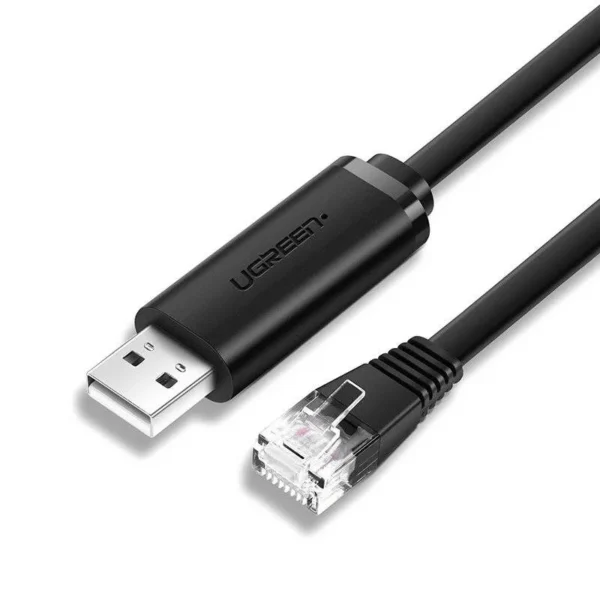
UGREEN CM204 USB-A to RJ45 Console Cable 1.5 m
Key Features:
- Ugreen USB RJ45 Cable (also known as Cisco Cable, Control Cable, Programming Cable ..) is specialized for programming network devices such as servers, switches, routers, and other network devices … Using chipsets High-end FTDI FT-232 has high stability, compatibility and durability.
- Ugreen genuine USB to RJ45 console programming cable has built-in protection circuit that responds to the characteristics of ESD current (electrostatic discharge), can withstand up to 4KV, helps protect Chipsets are not damaged by static electricity caused by hot plugging.
- Ugreen USB to RJ45 Console cable has an 8-core transmission structure, each twisted core twisted together to help protect against external electromagnetic interference and provide more stable transmission performance. Ugreen 50773 USB Console Cable has stronger performance, supports RS232 serial interface, Remote Wake-up support, power management support, Handshake protocol support, etc.
SKU: n/a -
-
Ugreen Accessories, Ugreen USB
UGREEN USB 3.0 Hub (3 USB 3.0) with Gigabit Ethernet Adapter
Brand UGREEN Connectivity Technology USB, Ethernet Compatible Devices USB Flash Drives, PC, Mouse, Keyboards, Laptops Included Components Cable Input Voltage 240 Volts Total USB Ports 3 Wattage 36 watts Power Source Corded Electric Current Rating 2 Amps SKU: n/a

There are no reviews yet.