
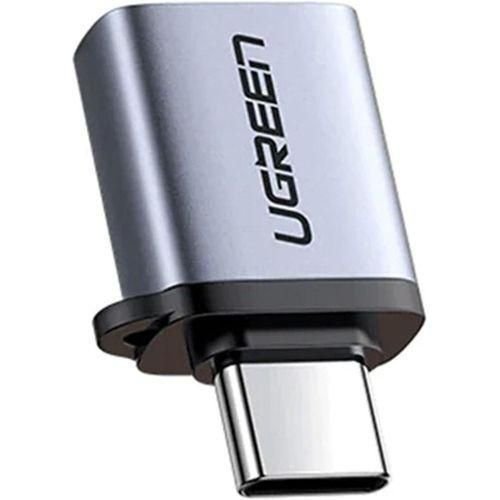
UGREEN Type C to USB 3.0 Adapter Cable with Lanyard- US270
- Device type: USB type C Male to USB 3.0 A adapter
- Aluminum case
- Data transfer speed: 5Gbps
- Warranty: 15 Months Brand Warranty
KSh950.00 KSh1,300.00 EX-VAT
UGREEN Type C to USB 3.0 Adapter Cable with Lanyard – US270
The UGREEN US270 connects USB-A peripherals and flash drives to modern USB-C laptops and tablets through a compact adapter cable. This 10cm adapter bridges the gap between newer devices and your existing USB accessories without requiring you to replace functional equipment. Students can use their standard USB flash drives with newer laptops, while business professionals maintain compatibility with presentation clickers, wireless mouse receivers, and client-provided USB storage.
Key Features & Benefits
- USB 3.0 High-Speed Data Transfer: Supports transfer rates up to 5 Gbps, copying a 2GB file in approximately 5-10 seconds, making it 10 times faster than older USB 2.0 adapters for quick file backups and transfers.
- Integrated Lanyard Loop: Attaches to keychains, laptop bags, or cable organizers so the adapter stays accessible when you need it, preventing the frustration of searching through bags during important meetings or classes.
- Compact 10cm Design: The short cable length reduces desk clutter while providing enough flexibility to accommodate side-by-side USB-C ports without blocking adjacent connections on crowded laptop sides.
- Plug-and-Play Compatibility: Works immediately without drivers across all major operating systems, letting you connect USB devices the moment you plug in the adapter without installation delays.
- Durable Aluminum Construction: Heat-dissipating metal housing protects internal components and withstands the repeated plugging and flexing that portable adapters endure in backpacks and laptop bags.
Technical Specifications
Performance
- USB Standard: USB 3.0 (USB 3.1 Gen 1, 5 Gbps)
- Data Transfer Speed: Up to 5 Gbps theoretical (625 MB/s)
- Backward Compatible: USB 2.0 (480 Mbps) and USB 1.1 (12 Mbps) devices
- Power Output: Up to 900mA at 5V for connected devices
Physical Design
- Cable Length: 10cm (3.9 inches)
- Connectors: USB-C male to USB-A 3.0 female
- Weight: 12g (0.4 oz)
- Material: Aluminum alloy housing with braided nylon cable
- Color: Space Gray with black braided cable
- Lanyard: Integrated loop on USB-C connector end
Compatibility
- Host Devices: Any device with USB-C port
- MacBook Pro/Air (2016 and later)
- iPad Pro, iPad Air (4th gen and later)
- Dell XPS, HP Spectre, Surface laptops
- Samsung Galaxy tablets and phones
- Google Pixel phones and Chromebooks
- Operating Systems:
- Windows 7/8/10/11
- macOS 10.6 or later
- Chrome OS
- Linux
- Android 5.0 or later
- iPadOS 13 or later
- Peripheral Support:
- USB flash drives, external hard drives
- Keyboards, mice, game controllers
- Wireless adapters, Bluetooth dongles
- Presentation remotes, laser pointers
- Card readers, DAC/audio interfaces
- Webcams, USB microphones
USB 3.0 Specifications
- Connector Type: USB-A female (blue tongue indicator)
- Pin Configuration: 9-pin (backward compatible with 4-pin USB 2.0)
- Maximum Cable Length: 3 meters for USB 3.0 speeds
Use Cases & Applications
For Students
Keep using your reliable USB flash drive collection with your new USB-C laptop. Rather than buying expensive USB-C drives or dealing with dongles that fall out, attach the US270 to your keychain so it’s always available when professors share lecture materials or you need to submit assignments on campus computers.
Connect USB accessories during study sessions without blocking your laptop’s other USB-C ports. The 10cm cable provides enough clearance to use your charging cable and USB mouse simultaneously on laptops with closely-spaced ports.
Share files quickly between your USB-C laptop and classmates using older computers with standard USB ports. Load assignments onto your flash drive through the adapter, then classmates can plug your drive directly into their traditional USB-A ports.
For Business Professionals
Maintain access to client-provided USB drives during meetings and presentations. Many clients still use standard USB flash drives for file sharing—the US270 ensures you can access their materials immediately without explaining compatibility issues or requesting alternate transfer methods.
Use your existing wireless presentation remote with new laptops. Professional presentation clickers typically use USB-A receivers—keep the adapter attached to your clicker’s receiver so your proven presentation tools work with any laptop.
Connect to conference room equipment that requires USB-A connections. Some projectors, document cameras, and room control systems still use standard USB ports for firmware updates or control interfaces.
For Hot-Desking & Coworking
Carry one small adapter instead of multiple USB-C peripherals. The lanyard lets you attach the US270 to your laptop bag’s zipper pull or cable organizer, ensuring it’s available when you arrive at different workstations with varying peripheral setups.
Access shared USB drives and security keys in office environments. Many companies use physical USB security tokens or shared storage drives with USB-A connectors—the adapter maintains compatibility without requiring IT departments to upgrade all peripherals immediately.
For Content Creators
Connect USB audio interfaces, MIDI controllers, and legacy studio equipment to modern USB-C laptops. Many professional audio and music production devices use USB-A connections—the US270 preserves your existing equipment investment while using newer computers.
Read footage from USB card readers and external drives during video editing workflows. Professional photographers and videographers often have extensive collections of USB-A storage devices and card readers that remain perfectly functional with this simple adapter.
For Gaming & Entertainment
Use wired gaming controllers, arcade sticks, and racing wheels with USB-C laptops. Gaming peripherals frequently feature USB-A connections, and the adapter’s USB 3.0 speed ensures minimal input latency for competitive gaming.
Connect USB DACs (digital-to-analog converters) for high-quality audio playback. Audiophile-grade USB DACs typically use USB-A connections—the adapter enables premium audio quality from USB-C devices without sacrificing sound quality.
For Travel & Remote Work
Pack one lightweight adapter instead of USB-C versions of all your accessories. The 12-gram weight adds virtually nothing to your laptop bag, while the lanyard prevents it from getting lost in luggage during frequent travel.
Connect to hotel business center computers and print stations. When you need to print boarding passes or documents, the adapter lets you transfer files from your USB-C phone or tablet to older hotel computers via flash drive.
Technical Considerations
The adapter supports USB 3.0’s full 5 Gbps bandwidth, but actual transfer speeds depend on your connected device. A USB 2.0 flash drive operates at USB 2.0 speeds (480 Mbps maximum) regardless of the adapter’s capabilities. Check your peripheral specifications to understand expected performance.
Power delivery through the adapter is limited to standard USB 3.0 specifications (900mA at 5V, or 4.5W). This powers most peripherals like mice, keyboards, and flash drives, but some external hard drives or power-hungry devices may require additional power from a powered USB hub.
The 10cm cable length works well for most situations but may feel short when connecting larger USB devices like some external hard drives. The flexibility prevents stress on USB-C ports compared to rigid plug-style adapters that leverage directly against port connections.
USB 3.0 uses additional pins not present in USB 2.0 cables. While the adapter itself supports USB 3.0 speeds, connecting it to a USB 2.0 device or using it with USB 2.0 cables will limit speeds to 480 Mbps. Look for the blue tongue inside USB connectors to identify USB 3.0 ports and cables.
The adapter provides data connectivity only—it doesn’t support video output, charging protocols, or alternate modes like DisplayPort or Thunderbolt. For video output to displays, you need dedicated USB-C to HDMI or DisplayPort adapters.
Important Notes: The braided cable design resists tangling and provides strain relief at both connector points, extending the adapter’s lifespan compared to bare rubber cables. The lanyard loop accommodates cords up to 3mm diameter—compatible with most keychains, bag straps, and cable organizers. When connecting USB devices that include both USB-A and separate power cables (like some external hard drives), ensure the power cable is also connected if the device requires more than 900mA. The adapter maintains backward compatibility, so older USB 1.1 and 2.0 devices work perfectly, just at their native speeds. For maximum data transfer speeds, ensure both your host device’s USB-C port and your peripheral support USB 3.0 or higher—adapters can’t improve the speed of slower components in the chain.
Based on 0 reviews
Be the first to review “UGREEN Type C to USB 3.0 Adapter Cable with Lanyard- US270”
Related products
-
Ugreen Accessories
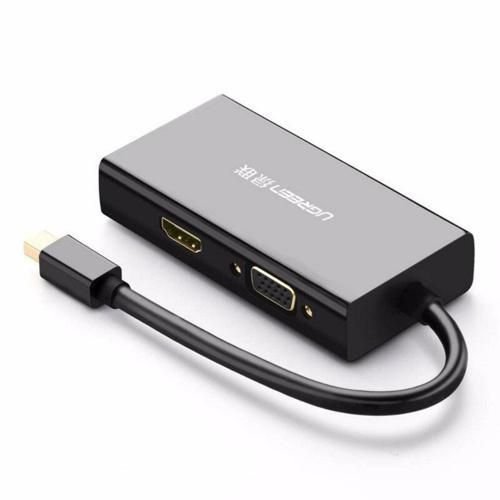
UGREEN Mini DisplayPort to HDMI/VGA/DVI Converter
- Input: Mini DP(Thunderbolt2 interface compatible)
- Output: HDMI/ VGA/ DVI(24+1) Female
- VGA Port: 1080P@60Hz,8-bit deep color/162MHz
- DVI(24+1) port: 1080P@60Hz,10-bit deep color/162MHz
- HDMI Port: 4K*2k@30Hz
- Only HDMI port support audio
- ABS Case
- Support Windows XP, Windows Vista, Windows 7 and Mac OS X v10.5 or later
SKU: n/a -
Ugreen Accessories
UGREEN PowerRoam Portable Power Station 600W UK – GS600
Sku 15051A Capacity 680Wh, 30.4Ah, 22.4V (212800mAh 3.2V) Total Output Power 965W Max AC Output (×2) 230V~, 50Hz, 2.6A, 600W Max USB-A Output (×2) Single Port: 5V=3A, 9V=2A, 12V=1.5A, 5V=4.5A
Dual Port: 45W MaxUSB-C Output (×2) Single Port: 5V=3A, 9V=3A, 12V=3A, 15V=3A, 20V=5A
Dual Port: 200W MaxCar Charger Port Output (×1) 12V=10A, 120W SKU: n/a -
Ugreen Accessories, Ugreen USB
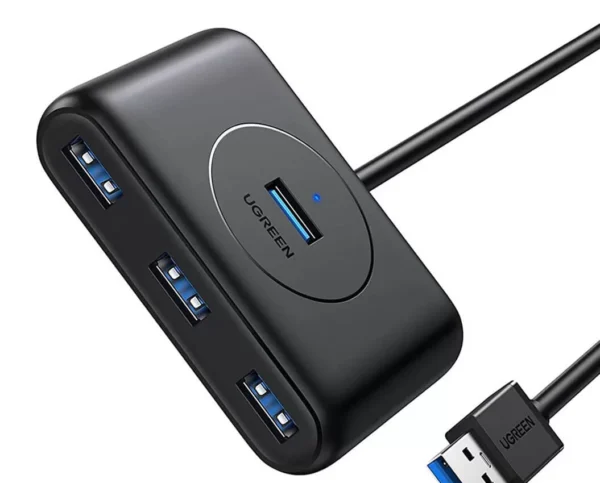
UGREEN USB 3.0 Hub (3 USB 3.0) with Gigabit Ethernet Adapter
Brand UGREEN Connectivity Technology USB, Ethernet Compatible Devices USB Flash Drives, PC, Mouse, Keyboards, Laptops Included Components Cable Input Voltage 240 Volts Total USB Ports 3 Wattage 36 watts Power Source Corded Electric Current Rating 2 Amps SKU: n/a -
Ugreen Accessories
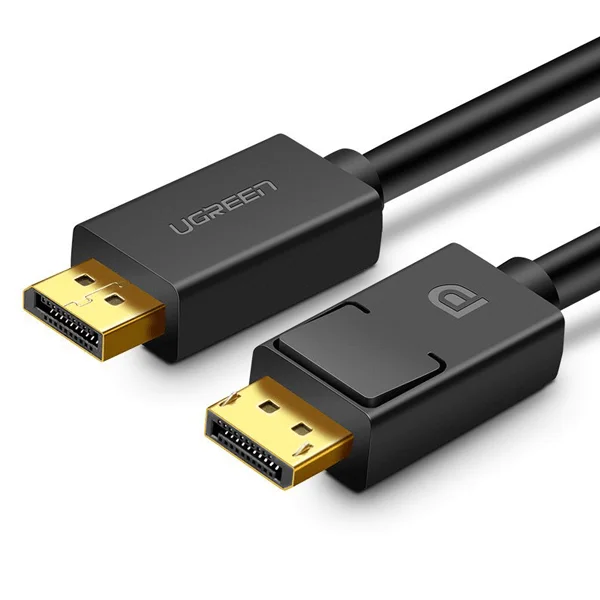
UGREEN DP Male to Male Cable 1.5m (Black)
Key Features;
- The adapter supports the simultaneous transmission of video in 4K @30Hz Resolution and Audio
- A one-way cable that allows you to transfer image and sound from a device with DisplayPort to a device with an HDMI port
- The adapter works in Plug & Play mode, no additional drivers are needed for it
- UGREEN DP to HDMI cable connects monitor, HDTV and projector with laptop or pc
SKU: n/a


There are no reviews yet.