
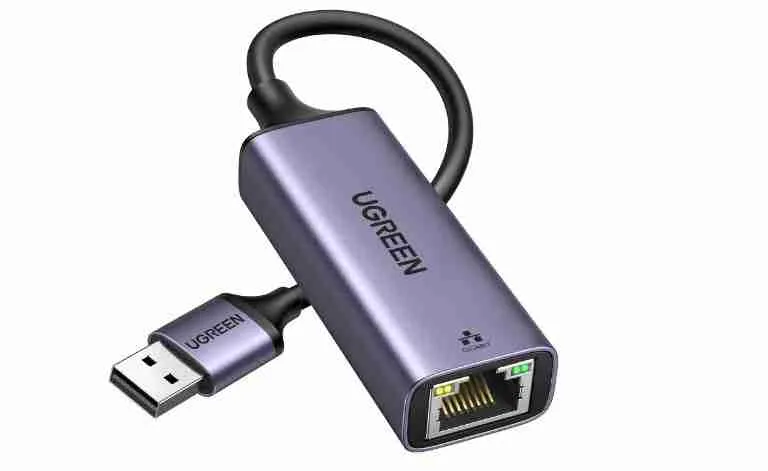
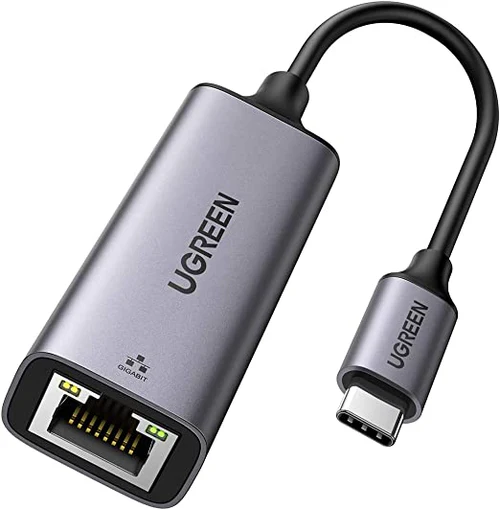
UGREEN USB 3.0 to RJ45 Gigabit Ethernet Adapter Aluminum Case
Key Features
- Brand: UGREEN
- USB 2.0 Hub: 3 Ports
- Ethernet Network: 10/100Mbps
- Dual Functions
- Fast And More Reliable
- Great Compatibility
- Slim And Portable
- 1 Year Warranty
KSh2,200.00 KSh3,100.00 EX-VAT
UGREEN USB 3.0 to RJ45 Gigabit Ethernet Adapter Aluminum Case
The UGREEN USB 3.0 Ethernet adapter adds a wired Gigabit network connection to any computer with a USB port. This compact adapter delivers stable internet speeds up to 1000 Mbps, bypassing unreliable Wi-Fi when you need consistent connectivity for video conferences, large file transfers, or online gaming. Students gain dependable connections for timed exams and online classes, while business professionals ensure reliable performance during critical presentations and client calls.
Key Features & Benefits
- Gigabit Ethernet Performance: Delivers network speeds up to 1000 Mbps for fast downloads and smooth 4K streaming, significantly outperforming standard 100 Mbps adapters when your internet plan and router support higher speeds.
- USB 3.0 High-Speed Interface: Utilizes 5 Gbps USB bandwidth to handle full Gigabit throughput without bottlenecks, ensuring your wired connection performs as fast as your network infrastructure allows.
- Aluminum Housing with Heat Dissipation: Durable metal construction efficiently disperses heat during extended use while protecting internal components, maintaining stable performance during all-day work sessions or long gaming marathons.
- Plug-and-Play Simplicity: Works immediately on Windows 10/11, macOS, Chrome OS, and modern Linux distributions without driver downloads, letting you connect to wired networks within seconds of plugging in.
- Ultra-Portable Design: Measures just 6cm long and weighs 28 grams, slipping easily into laptop bags or pockets for reliable connectivity wherever you work or study.
Technical Specifications
Network Performance
- Ethernet Speed: 10/100/1000 Mbps auto-negotiation
- Chipset: Realtek RTL8153
- Standards: IEEE 802.3, 802.3u, 802.3ab (Gigabit Ethernet)
- Interface: USB 3.0 (USB 3.1 Gen 1, 5 Gbps)
- Backward Compatible: USB 2.0 ports (limited to ~480 Mbps)
Physical Design
- Dimensions: 60mm × 24mm × 15mm (2.4″ × 0.9″ × 0.6″)
- Cable Length: 15cm (5.9 inches) integrated cable
- Weight: 28g (1 oz)
- Port: RJ45 Gigabit Ethernet jack
- Material: Aluminum alloy body with ABS plastic connector
- Color: Space Gray
- LED Indicator: Green light shows connection status and activity
Power
- Power Source: Bus-powered via USB (no external adapter needed)
- Power Consumption: Maximum 2.5W during peak usage
- Sleep Mode: Automatic power saving when inactive
Compatibility
- Operating Systems:
- Windows 10/11 (driver-free)
- Windows 7/8/8.1 (drivers available on UGREEN website)
- macOS 10.6 or later
- Chrome OS
- Linux kernel 3.0 or later
- Android 6.0 or later (device-dependent)
- Devices:
- Laptops (Windows, Mac, Chromebook)
- Desktop computers
- Ultrabooks and tablets with USB ports
- Nintendo Switch (handheld and docked mode)
- Some smart TVs and streaming devices
Network Features
- Wake-on-LAN (WoL) support
- Full-duplex and half-duplex operation
- Auto MDI/MDIX crossover detection
- IPv4 and IPv6 protocol support
- Jumbo frames up to 9K
- Energy Efficient Ethernet (IEEE 802.3az)
Use Cases & Applications
For Students
Ensure stable connections during timed online exams where dropped Wi-Fi signals could cost you submission time or exam access. The UGREEN adapter provides consistent network access in dorm rooms where dozens of devices compete for wireless bandwidth, especially during peak evening hours.
Connect reliably to university networks in lecture halls and libraries where Wi-Fi authentication systems cause frequent disconnections. Wired connections through campus Ethernet ports often provide faster, more stable access to library databases and research resources than congested wireless networks.
Stream online lectures without buffering or quality drops. When attending remote classes or watching recorded lectures, wired connections eliminate the frozen video and audio dropouts that cause you to miss important information.
For Business Professionals
Maintain professional video conference quality in hotels, coworking spaces, and client offices where Wi-Fi reliability varies. Wired connections eliminate the frozen screens, audio dropouts, and reconnection delays that undermine your credibility during important presentations.
Upload large files to cloud storage and client portals faster and more reliably than over wireless connections. A 500MB presentation that might take 10 minutes over congested hotel Wi-Fi transfers in 1-2 minutes over Gigabit Ethernet.
Connect to corporate networks that require wired connections for security compliance or VPN access. Many enterprise environments mandate Ethernet for accessing sensitive systems, making the adapter essential equipment for remote workers and traveling consultants.
For Remote Work Setups
Create a stable home office network connection when your workspace sits far from your Wi-Fi router. Rather than investing in mesh systems or range extenders, run an Ethernet cable directly to your desk for consistently fast speeds.
Reduce latency and packet loss during VoIP calls and video conferences. Wired connections provide the steady performance required for professional communication tools like Zoom, Microsoft Teams, and Slack huddles without the interference issues common in wireless connections.
Separate work network traffic from household Wi-Fi congestion. When family members stream videos or play online games, your wired connection maintains consistent performance for business-critical tasks.
For Ultrabook & MacBook Users
Add network connectivity to thin-and-light laptops that lack built-in Ethernet ports. Modern ultrabooks prioritize portability over port selection—this adapter restores wired networking capability without compromising your device’s sleek design.
Connect MacBook Air and MacBook Pro models to wired networks in offices and conference rooms. Apple removed Ethernet ports from most MacBook models, making adapters essential for professionals who need reliable wired connections.
For Gaming
Lower your ping times in competitive online gaming. Wired connections through the adapter reduce latency compared to Wi-Fi, giving you faster response times in multiplayer games where milliseconds matter.
Eliminate lag spikes and packet loss that cause gameplay disruptions. Competitive gamers know that consistent connection quality matters more than raw speed—wired Ethernet provides stability that wireless connections struggle to match.
Connect Nintendo Switch to wired networks for better online gaming performance. The Switch supports USB Ethernet adapters in docked mode, significantly improving connection stability for games like Splatoon, Smash Bros, and Mario Kart.
For Streaming & Content Creation
Stream gameplay or host virtual events without bandwidth fluctuations. Consistent upload speeds through Gigabit Ethernet ensure smooth broadcasts to Twitch, YouTube, or video conferencing platforms without dropped frames or quality degradation.
Upload video content to platforms faster and more reliably. Content creators dealing with multi-gigabyte video files benefit from stable wired connections that maintain speed throughout lengthy uploads.
For Broken or Disabled Network Cards
Restore internet connectivity to laptops with failed built-in network adapters. Rather than expensive motherboard repairs, this adapter provides an immediate, affordable networking solution.
Bypass problematic Wi-Fi cards experiencing driver issues or hardware failures. Keep working or studying while troubleshooting wireless problems by using wired connectivity as a temporary or permanent solution.
For Smart Home & IoT Devices
Connect smart TVs, streaming boxes, and gaming consoles that lack Ethernet ports. Some devices include only Wi-Fi but perform better with wired connections—this adapter enables Ethernet connectivity where built-in ports don’t exist.
Set up network-attached storage and home servers with reliable connections. Devices handling constant data transfers benefit from the stability and full-duplex capability of wired Ethernet.
Technical Considerations
The adapter negotiates automatically with your router or switch to select the fastest supported speed (10, 100, or 1000 Mbps). However, the actual speed you experience depends on your internet service plan and network equipment—Gigabit Ethernet capability doesn’t increase speeds beyond what your ISP provides.
For optimal Gigabit performance, use Cat5e, Cat6, or higher-rated Ethernet cables. Older Cat5 cables may limit speeds to 100 Mbps even though the adapter supports 1000 Mbps. Cable quality matters for maintaining full-speed connections.
The USB 3.0 interface provides 5 Gbps bandwidth, which comfortably handles Gigabit Ethernet’s 1 Gbps requirement plus overhead. Connecting to USB 2.0 ports still works but bottlenecks speeds to roughly 300-400 Mbps maximum due to USB 2.0’s 480 Mbps limitation.
Windows 10 and 11 include native drivers for the Realtek RTL8153 chipset, enabling true plug-and-play operation. Windows 7 and 8 users may need to download drivers from the UGREEN website for full functionality. macOS has supported this chipset natively since OS X 10.6, making it popular among Mac users.
The aluminum housing serves dual purposes—structural protection and heat dissipation. The metal construction transfers heat away from the chipset more effectively than plastic adapters, preventing thermal throttling during sustained high-bandwidth use.
Cable Length Considerations: The 15cm integrated cable provides enough flexibility to reach USB ports on either side of laptops without creating excess cable length that clutters your workspace. The cable cannot be replaced if damaged, so handle the adapter by its body rather than pulling on the cable.
Power and Compatibility: Most modern computers provide adequate power through USB ports for the adapter’s operation. However, some older laptops or devices with low-power USB implementations may struggle with power delivery. If the adapter isn’t recognized or disconnects intermittently, try connecting to different USB ports or ensure your laptop is plugged into AC power rather than running on battery.
LED Indicator Behavior: The green LED confirms network activity—solid light indicates successful connection, while flashing shows active data transfer. No light suggests either the Ethernet cable isn’t connected, your router/switch isn’t powered, or the adapter isn’t receiving power from the USB port.
Wake-on-LAN Functionality: This feature allows network administrators to remotely wake computers from sleep or hibernation states over the network. Functionality depends on both operating system support and BIOS/system configuration. Consult your device documentation for setup instructions.
Nintendo Switch Compatibility: The Switch supports USB Ethernet adapters in docked mode only, not in handheld mode. The adapter appears in Switch network settings after connection, where you can configure wired connection preferences. This significantly improves online gaming stability compared to Switch’s often-criticized Wi-Fi performance.
Important Notes: When first connecting the adapter, allow your operating system a few seconds to recognize and configure the network device. Most systems automatically prefer wired Ethernet over Wi-Fi when both are available, but you can verify connection preferences in network settings. If your network doesn’t appear, check that your Ethernet cable is properly connected at both ends and that your router or switch shows link lights. Some USB-C hubs and docking stations may experience compatibility issues when the adapter connects alongside multiple other peripherals—for best results, connect directly to your computer’s USB port. The adapter works with both straight-through and crossover Ethernet cables due to auto MDI/MDIX detection. For permanent desk setups, secure the Ethernet cable with clips to prevent stress on the adapter’s RJ45 port. The compact design means the adapter can remain semi-permanently attached to your laptop, though the USB connector may occasionally need reseating if loosened by cable movement. Store the adapter in a protective case when traveling to prevent damage to the RJ45 jack and USB connector.
Based on 0 reviews
Be the first to review “UGREEN USB 3.0 to RJ45 Gigabit Ethernet Adapter Aluminum Case”
Related products
-
Ugreen Accessories
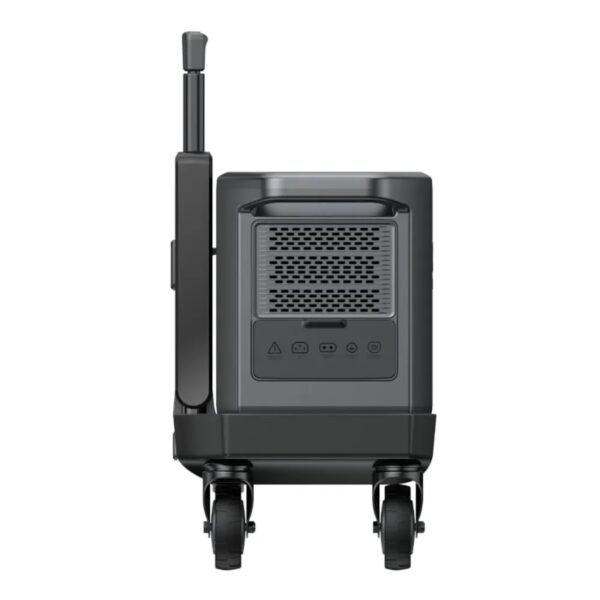
UGREEN PowerRoam Power Station 2048Wh 2300W UK-GS2200
FEATURES:
- 2200Wh Lithium Iron Phosphate (LiFePO4) batteries
- Powers Various Appliances and Devices
- UPS functionality with 20ms switchover
- Features 14 outlets – 4 AC Outlets(2200W Total), 4 USB Type-C Ports(140W, 100w, 2 x 45W), 2 USB Type-A Ports(22.5W Each), 2 Car/DC Outlets(120W Total), Anderson output 300W
- Recharge the battery from 0% to 100% within 1.5 hours
- System Management App proactively monitors and protects the Power Station
- Convenient 4-wheel trolley with adjustable handle
SPECIFICATIONS:
- Capacity: 2048Wh
- Cycle Life (80%): 3000
- Wi-Fi/Bluetooth/App Support: Yes
- Input Ports: AC(1800W) x 1, Solar Charging Port(1200W Max) x 2 (supports Car Charing 12/24V 8A Max)
- Output Ports: AC outlet 2200W x 4, USB Type-C x 1 (140W), USB Type-C x 1 (100W), USB Type-C x 2 (45W), USB-A x 2 (22.5W), Car Charger x 1, Anderson Output (300W) x1, DC5521 x 2
- Power Source: AC Powered (1.5 hours), Solar Powered (2.5 hours), Car Powered (24/12 hours)
- Display: 4.7 inch LCD
- Item Weight: 25000g
- Product Dimensions: 54 x 25 x 29 cm
FEATURED FUNCTIONS:
- Quiet Mode
- Energy-Saving Mode
- Child Safety Lock
- Battery Preservation Mode
ESTIMATED HOURS OF RUNTIME:
- Home Sound System (95W): 17.2 hrs
- 55″ LED TV (140W): 11.7 hrs
- Slow Cooker (250W): 6.6 hrs
- Desktop PC (300W): 5.5 hrs
- Double-Door Fridge (780W): 2.1 hrs
- Microwave (800W): 2.0hrs
- Electric Drill (850W): 1.9 hrs
- Washing Machine (800W): 1.9 hrs
WHAT’S IN THE BOX:
- Ugreen PowerRoam 2200 Portable Power Station x1
- PowerRoam Trolley x1
- AC Charging Cable x1
- Car Charging Cable x1
- Solar Parallel Adapter x1
- Accessory Bag x1
- User Manual x1
SKU: n/a -
Ugreen Accessories
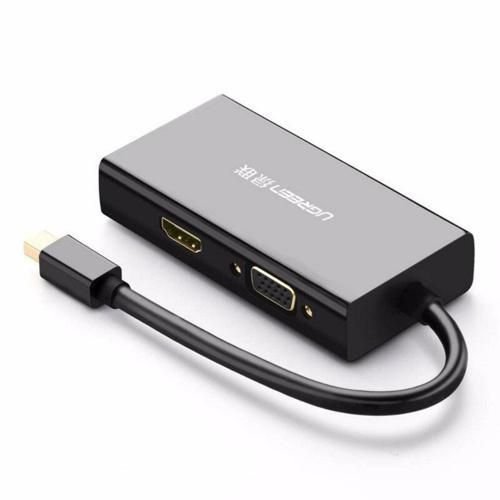
UGREEN Mini DisplayPort to HDMI/VGA/DVI Converter
- Input: Mini DP(Thunderbolt2 interface compatible)
- Output: HDMI/ VGA/ DVI(24+1) Female
- VGA Port: 1080P@60Hz,8-bit deep color/162MHz
- DVI(24+1) port: 1080P@60Hz,10-bit deep color/162MHz
- HDMI Port: 4K*2k@30Hz
- Only HDMI port support audio
- ABS Case
- Support Windows XP, Windows Vista, Windows 7 and Mac OS X v10.5 or later
SKU: n/a -
-
-
Ugreen Accessories, Ugreen USB
UGREEN USB-C 3.1 GEN1 To Gigabit Ethernet Adapter CM483
Key Feature
- Faster and more stable wired network than Wi-Fi.
- Up to 1000Mbps internet speed.
- Effortless to use, no driver needed.
- Compatible with most USB C or Thunderbolt 3 devices.
- Durable and lasting design.
- Compact and portable size.
- High-performance AX88179A chip
SKU: n/a

There are no reviews yet.