
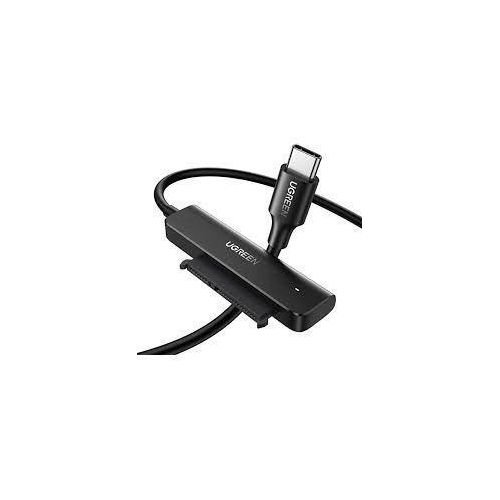
UGREEN USB-C 3.0 to 2.5-Inch SATA Converter – CM321
- QUICKLY ACCESS A SATA SSD/HDD
- 5GBPS FAST SPEED WITH UASP
- NO DRIVER & EASY USE
- USER-FRIENDLY DESIGN
- BROAD COMPATIBLITY
KSh1,950.00 KSh2,300.00 EX-VAT
UGREEN USB-C 3.0 to 2.5-Inch SATA Converter – CM321
The UGREEN CM321 connects 2.5-inch SATA hard drives and SSDs directly to your USB-C laptop or tablet without requiring external enclosures. This cable adapter transforms internal drives into portable storage or enables quick data recovery from old laptops in minutes. Students can repurpose drives from upgraded laptops for additional storage space, while business professionals gain a straightforward solution for accessing archived data and backing up important files.
Key Features & Benefits
- Tool-Free Drive Access: Connect any 2.5-inch SATA drive instantly without screwdrivers, enclosures, or technical expertise, making data recovery from non-booting laptops quick and accessible even for non-technical users.
- USB 3.0 Speed Performance: Transfer files at up to 5 Gbps (625 MB/s theoretical), moving a 10GB folder in approximately 20-30 seconds depending on drive speed, dramatically faster than older USB 2.0 adapters.
- Universal SATA Compatibility: Works with both 2.5-inch SATA HDDs and SSDs including SATA I, SATA II, and SATA III standards, supporting drives from all major manufacturers like Seagate, Western Digital, Samsung, and Crucial.
- UASP Protocol Support: Utilizes USB Attached SCSI Protocol for faster data transfer speeds and reduced CPU usage compared to standard mass storage protocols, particularly noticeable with SSDs.
- Bus-Powered Operation: Draws power directly from your device’s USB-C port to run standard 2.5-inch drives without bulky external power adapters, keeping your setup portable and cable-free.
Technical Specifications
Performance
- Interface: USB-C 3.0 (USB 3.1 Gen 1, 5 Gbps)
- Drive Interface: SATA I/II/III (1.5/3/6 Gbps)
- Transfer Speed: Up to 5 Gbps (limited by drive performance)
- Protocol Support: UASP (USB Attached SCSI Protocol)
- Maximum Capacity: Supports drives up to 6TB
Drive Compatibility
- Form Factor: 2.5-inch drives only (7mm and 9.5mm heights)
- Drive Types: SATA HDD, SATA SSD
- Standards: SATA I (1.5 Gbps), SATA II (3 Gbps), SATA III (6 Gbps)
- Note: Not compatible with 3.5-inch drives, mSATA, M.2, or IDE drives
Physical Design
- Cable Length: 50cm (19.7 inches) total
- Connector Type: USB-C male to SATA 22-pin (7+15)
- Weight: 45g (1.6 oz)
- Material: PVC cable with ABS plastic connectors
- LED Indicator: Blue activity light on SATA connector
Power
- Power Source: USB bus-powered
- Power Consumption: Standard 2.5-inch drives (500mA typical)
- Note: Some high-performance SSDs may require additional power
System Compatibility
- Windows 7/8/10/11 (driver-free)
- macOS 10.6 or later
- Linux kernel 2.6.31 or later
- Chrome OS
- Android 6.0 or later with OTG support
- File Systems: NTFS, FAT32, exFAT, HFS+, APFS, ext3, ext4
Use Cases & Applications
For Students
Recover important assignments and research papers from a laptop that won’t boot. Connect the drive from your damaged laptop to a working computer using the CM321, then copy your files to safety—no need to pay for professional data recovery services for simple access issues.
Repurpose the old drive after upgrading your laptop’s internal storage. That 500GB hard drive you replaced with a 1TB SSD becomes valuable portable storage for movies, music libraries, and project archives. Connect it whenever you need extra space without permanently occupying a USB port.
Share large project files with classmates without relying on slow cloud uploads. Load presentations, video projects, or datasets onto an old drive and let teammates connect it directly to their computers for instant access to gigabytes of shared materials.
For Business Professionals
Access archived business data stored on retired laptop drives. Companies often keep old drives from decommissioned equipment—the CM321 lets you retrieve contracts, financial records, or client files without reinstalling drives into working machines.
Create temporary backup solutions during travel. Connect your laptop’s internal drive to a colleague’s computer for quick file transfers or emergency backups when cloud services aren’t available or network speeds are inadequate.
Diagnose drive issues by testing suspect drives on known-good computers. IT professionals can quickly determine whether system problems stem from failing drives or other hardware issues without opening computer cases.
For Data Recovery & IT Work
Extract data from laptops with damaged motherboards or broken screens. When only the drive remains functional, the CM321 provides immediate access to stored files without repairing the entire device.
Clone drives for system migrations or upgrades. Connect both source and destination drives (using two adapters) to transfer complete system images or perform disk-to-disk copies for hardware replacements.
Test drive health and performance on multiple systems. Move suspect drives between computers to isolate whether performance issues relate to the drive itself or the host system configuration.
For Media Libraries & Photography
Store and organize large photo libraries across multiple drives. Professional photographers can keep project archives on individual drives, connecting them as needed rather than keeping all storage constantly attached and consuming power.
Access camera footage or raw video files from external recording drives. Some cameras record to removable SSDs—connect these drives directly to your editing workstation for immediate access without transferring through slower card readers.
For Repurposing Old Hardware
Transform old laptop drives into external storage without buying expensive enclosures. The CM321 costs significantly less than dedicated enclosures while providing equivalent functionality for occasional access needs.
Test drives before disposal to ensure sensitive data has been properly wiped. Connect old drives to verify they’ve been securely erased before recycling or selling equipment.
Technical Considerations
The adapter works with standard 2.5-inch drives in both 7mm and 9.5mm heights, covering virtually all laptop hard drives and SSDs. However, 3.5-inch desktop drives require more power than USB-C ports provide and won’t function with this adapter—they need dedicated external enclosures with separate power supplies.
UASP support provides noticeable speed improvements with SSDs compared to older BOT (Bulk-Only Transport) protocol. Your computer must support UASP to benefit—most Windows 8 and later, macOS 10.8 and later, and recent Linux systems include UASP drivers.
Some high-performance SSDs or power-hungry 2.5-inch drives may exceed the 900mA power limit of standard USB 3.0 ports. If your drive isn’t recognized or disconnects during use, try a USB-C port with higher power output or use a powered USB hub.
Transfer speeds depend heavily on drive type—traditional spinning hard drives typically reach 100-130 MB/s, while SATA SSDs can approach 500 MB/s. The adapter itself doesn’t limit performance within USB 3.0’s 5 Gbps bandwidth.
The 50cm cable length provides flexibility for desktop use but keeps the drive close enough to laptops for stable connections. Longer cable runs can cause voltage drops that affect drive stability, so avoid using USB extension cables with this adapter.
Important Notes: Format compatibility depends on your operating system—Windows natively reads NTFS and FAT32, macOS reads HFS+ and APFS but requires additional software for NTFS write access, and Linux supports most formats. For cross-platform compatibility, format drives as exFAT, which both Windows and macOS read and write natively. The blue LED illuminates during drive activity—continuous flashing indicates active data transfer, while solid light shows the drive is powered but idle. Always safely eject drives before disconnecting to prevent data corruption. Some drives may spin down after periods of inactivity and require a few seconds to spin up when accessed again.
Based on 0 reviews
Be the first to review “UGREEN USB-C 3.0 to 2.5-Inch SATA Converter – CM321”
Related products
-
Ugreen Accessories
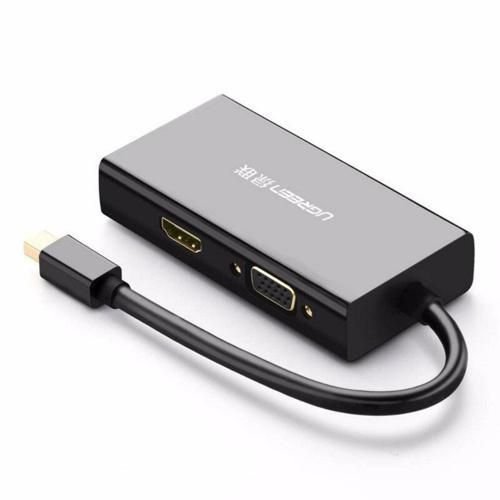
UGREEN Mini DisplayPort to HDMI/VGA/DVI Converter
- Input: Mini DP(Thunderbolt2 interface compatible)
- Output: HDMI/ VGA/ DVI(24+1) Female
- VGA Port: 1080P@60Hz,8-bit deep color/162MHz
- DVI(24+1) port: 1080P@60Hz,10-bit deep color/162MHz
- HDMI Port: 4K*2k@30Hz
- Only HDMI port support audio
- ABS Case
- Support Windows XP, Windows Vista, Windows 7 and Mac OS X v10.5 or later
SKU: n/a -
Ugreen Accessories
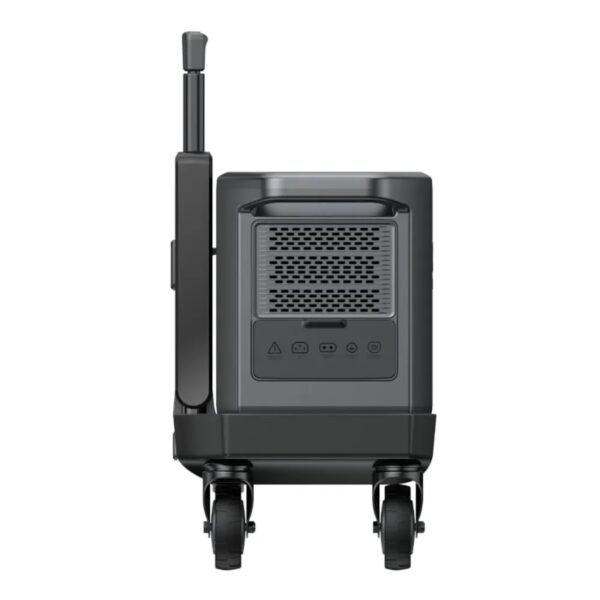
UGREEN PowerRoam Power Station 2048Wh 2300W UK-GS2200
FEATURES:
- 2200Wh Lithium Iron Phosphate (LiFePO4) batteries
- Powers Various Appliances and Devices
- UPS functionality with 20ms switchover
- Features 14 outlets – 4 AC Outlets(2200W Total), 4 USB Type-C Ports(140W, 100w, 2 x 45W), 2 USB Type-A Ports(22.5W Each), 2 Car/DC Outlets(120W Total), Anderson output 300W
- Recharge the battery from 0% to 100% within 1.5 hours
- System Management App proactively monitors and protects the Power Station
- Convenient 4-wheel trolley with adjustable handle
SPECIFICATIONS:
- Capacity: 2048Wh
- Cycle Life (80%): 3000
- Wi-Fi/Bluetooth/App Support: Yes
- Input Ports: AC(1800W) x 1, Solar Charging Port(1200W Max) x 2 (supports Car Charing 12/24V 8A Max)
- Output Ports: AC outlet 2200W x 4, USB Type-C x 1 (140W), USB Type-C x 1 (100W), USB Type-C x 2 (45W), USB-A x 2 (22.5W), Car Charger x 1, Anderson Output (300W) x1, DC5521 x 2
- Power Source: AC Powered (1.5 hours), Solar Powered (2.5 hours), Car Powered (24/12 hours)
- Display: 4.7 inch LCD
- Item Weight: 25000g
- Product Dimensions: 54 x 25 x 29 cm
FEATURED FUNCTIONS:
- Quiet Mode
- Energy-Saving Mode
- Child Safety Lock
- Battery Preservation Mode
ESTIMATED HOURS OF RUNTIME:
- Home Sound System (95W): 17.2 hrs
- 55″ LED TV (140W): 11.7 hrs
- Slow Cooker (250W): 6.6 hrs
- Desktop PC (300W): 5.5 hrs
- Double-Door Fridge (780W): 2.1 hrs
- Microwave (800W): 2.0hrs
- Electric Drill (850W): 1.9 hrs
- Washing Machine (800W): 1.9 hrs
WHAT’S IN THE BOX:
- Ugreen PowerRoam 2200 Portable Power Station x1
- PowerRoam Trolley x1
- AC Charging Cable x1
- Car Charging Cable x1
- Solar Parallel Adapter x1
- Accessory Bag x1
- User Manual x1
SKU: n/a -
Ugreen Accessories
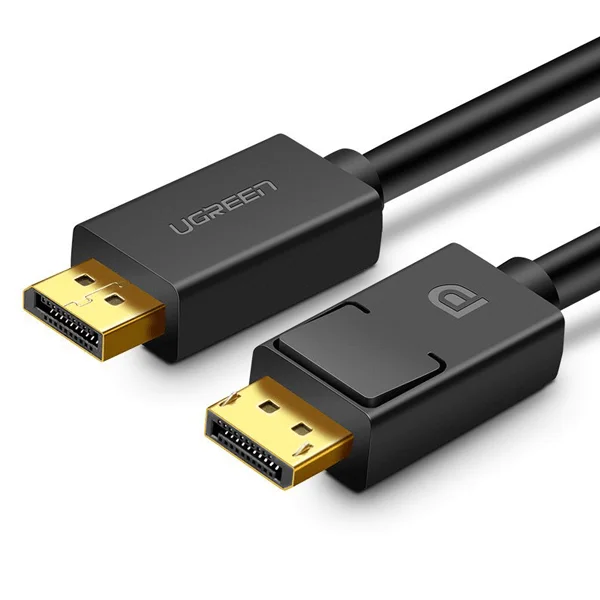
UGREEN DP Male to Male Cable 1.5m (Black)
Key Features;
- The adapter supports the simultaneous transmission of video in 4K @30Hz Resolution and Audio
- A one-way cable that allows you to transfer image and sound from a device with DisplayPort to a device with an HDMI port
- The adapter works in Plug & Play mode, no additional drivers are needed for it
- UGREEN DP to HDMI cable connects monitor, HDTV and projector with laptop or pc
SKU: n/a -
-

There are no reviews yet.