
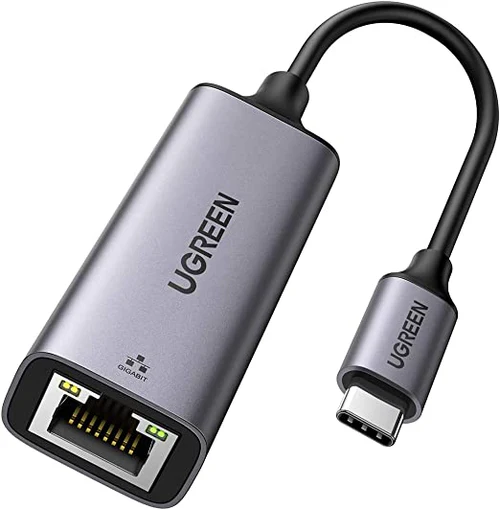
UGREEN USB-C 3.1 GEN1 To Gigabit Ethernet Adapter CM483
Key Feature
- Faster and more stable wired network than Wi-Fi.
- Up to 1000Mbps internet speed.
- Effortless to use, no driver needed.
- Compatible with most USB C or Thunderbolt 3 devices.
- Durable and lasting design.
- Compact and portable size.
- High-performance AX88179A chip
KSh3,300.00 KSh3,500.00 EX-VAT
UGREEN USB-C to Gigabit Ethernet Adapter CM483
The UGREEN CM483 adds a wired Gigabit Ethernet port to any laptop, tablet, or device with USB-C connectivity. This compact adapter delivers stable internet connections up to 1000 Mbps, bypassing unreliable Wi-Fi in crowded networks or areas with weak wireless signals. Students gain consistent connectivity for online exams and video lectures, while business professionals ensure reliable performance during critical video conferences and large file transfers.
Key Features & Benefits
- Gigabit Speed Performance: Delivers network speeds up to 1000 Mbps for fast file downloads and smooth 4K video streaming, significantly outperforming standard 100 Mbps adapters when your internet plan and router support higher speeds.
- USB-C 3.1 Gen 1 Interface: Utilizes 5 Gbps USB bandwidth to handle full Gigabit Ethernet throughput without bottlenecks, ensuring your wired connection performs as fast as your network infrastructure allows.
- Ultra-Portable Design: Weighs just 23 grams and measures 6cm long, slipping easily into laptop bags or pockets for reliable connectivity wherever you work or study.
- Plug-and-Play Simplicity: Works immediately on Windows, macOS, Chrome OS, and Linux systems without driver installation, letting you connect to wired networks within seconds of plugging in.
- Aluminum Housing with Heat Dissipation: Durable metal construction protects internal components while efficiently dispersing heat during extended use, maintaining stable performance during all-day work sessions.
Technical Specifications
Network Performance
- Ethernet Speed: 10/100/1000 Mbps auto-negotiation
- Chipset: Realtek RTL8153
- Standards: IEEE 802.3, 802.3u, 802.3ab
- Interface: USB-C (USB 3.1 Gen 1, 5 Gbps)
Physical Design
- Dimensions: 60mm × 30mm × 15mm (2.4″ × 1.2″ × 0.6″)
- Cable Length: 10cm (3.9 inches) integrated cable
- Weight: 23g (0.8 oz)
- Port: RJ45 Gigabit Ethernet jack
- Material: Aluminum alloy body with ABS plastic connector
- Color: Space Gray
Power
- Power Source: Bus-powered via USB-C (no external adapter needed)
- Power Consumption: Maximum 2.5W during peak usage
- LED Indicator: Green light shows connection status and activity
Compatibility
- Operating Systems:
- Windows 7/8/8.1/10/11 (driver-free)
- macOS 10.6 or later
- Chrome OS
- Linux kernel 3.0 or later
- Android 6.0 or later (device-dependent)
- Devices: MacBook Pro/Air, iPad Pro, Dell XPS, HP Spectre, Surface Go/Pro, Chromebooks, and other USB-C laptops and tablets
Network Features
- Wake-on-LAN (WoL) support
- Full-duplex and half-duplex operation
- Auto MDI/MDIX crossover detection
- IPv4 and IPv6 protocol support
Use Cases & Applications
For Students
Ensure stable connections during timed online exams where dropped Wi-Fi signals could cost you submission time. The UGREEN CM483 provides consistent network access in dorm rooms where dozens of devices compete for wireless bandwidth, especially during peak evening hours.
Connect reliably to university networks in lecture halls and libraries where Wi-Fi authentication systems cause frequent disconnections. Wired connections through campus Ethernet ports often provide faster, more stable access to library databases and research resources than congested wireless networks.
The compact adapter travels easily between home, campus, and study groups. Keep it attached to your laptop’s USB-C port or in your pencil case—its small size means you’ll always have wired connectivity as a backup when Wi-Fi fails during critical moments.
For Business Professionals
Maintain professional video conference quality in hotels, coworking spaces, and client offices where Wi-Fi reliability varies. Wired connections eliminate the frozen screens, audio dropouts, and reconnection delays that undermine your credibility during important presentations.
Upload large files to cloud storage and client portals faster and more reliably than over wireless connections. A 500MB presentation that might take 10 minutes over congested hotel Wi-Fi transfers in 1-2 minutes over Gigabit Ethernet.
Connect to corporate networks that require wired connections for security compliance or VPN access. Many enterprise environments mandate Ethernet for accessing sensitive systems, making the CM483 essential equipment for remote workers and traveling consultants.
For Remote Work Setups
Create a stable home office network connection when your workspace sits far from your Wi-Fi router. Rather than investing in mesh systems or range extenders, run an Ethernet cable directly to your desk for consistently fast speeds.
Reduce latency and packet loss during VoIP calls and video conferences. Wired connections provide the steady performance required for professional communication tools like Zoom, Microsoft Teams, and Slack huddles without the interference issues common in wireless connections.
Separate work network traffic from household Wi-Fi congestion. When family members stream videos or play online games, your wired connection maintains consistent performance for business-critical tasks.
For Gaming & Streaming
Lower your ping times in competitive online gaming. Wired connections through the CM483 reduce latency compared to Wi-Fi, giving you faster response times in multiplayer games where milliseconds matter.
Stream gameplay or host virtual events without bandwidth fluctuations. Consistent upload speeds through Gigabit Ethernet ensure smooth broadcasts to Twitch, YouTube, or video conferencing platforms without dropped frames or quality degradation.
For Ultrabook & Tablet Users
Add network connectivity to devices that lack built-in Ethernet ports. Modern thin-and-light laptops prioritize portability over port selection—the CM483 restores wired networking capability without compromising your device’s sleek design.
Connect iPads and Android tablets to wired networks for faster app downloads, system updates, and media synchronization. Tablets with USB-C ports can access Ethernet networks in the same way laptops do, though some Android devices may require USB Ethernet Adapter support in settings.
Technical Considerations
The adapter negotiates automatically with your router or switch to select the fastest supported speed (10, 100, or 1000 Mbps). However, the actual speed you experience depends on your internet service plan and network equipment—Gigabit Ethernet capability doesn’t increase speeds beyond what your ISP provides.
For optimal Gigabit performance, use Cat5e, Cat6, or higher-rated Ethernet cables. Older Cat5 cables may limit speeds to 100 Mbps even though the adapter supports 1000 Mbps. Cable quality matters for maintaining full-speed connections.
The USB-C 3.1 Gen 1 interface provides 5 Gbps bandwidth, which comfortably handles Gigabit Ethernet’s 1 Gbps requirement plus overhead. Connecting to older USB 2.0 ports via adapters will bottleneck speeds to roughly 100 Mbps maximum.
Some USB-C hubs and docking stations may experience compatibility issues when the CM483 is connected alongside multiple other peripherals. For best results, connect the adapter directly to your laptop’s USB-C port rather than through a hub.
Important Notes: The green LED indicator confirms successful network connection—solid light indicates connection established, flashing shows active data transfer. If the LED doesn’t illuminate, check that your Ethernet cable is properly connected and your router or switch is powered on. Most modern operating systems recognize the adapter immediately, but some Linux distributions may require manual driver configuration. Wake-on-LAN functionality depends on both operating system support and network configuration—consult your device documentation for setup instructions.
Based on 0 reviews
Be the first to review “UGREEN USB-C 3.1 GEN1 To Gigabit Ethernet Adapter CM483”
Related products
-
Ugreen Accessories, Ugreen USB
UGREEN USB 3.0 Hub (3 USB 3.0) with Gigabit Ethernet Adapter
Brand UGREEN Connectivity Technology USB, Ethernet Compatible Devices USB Flash Drives, PC, Mouse, Keyboards, Laptops Included Components Cable Input Voltage 240 Volts Total USB Ports 3 Wattage 36 watts Power Source Corded Electric Current Rating 2 Amps SKU: n/a -
Ugreen Accessories, Ugreen USB
UGREEN 9 in 1 USB-C Multifunction Docking Station-CM 274
Brand UGREEN Colour Black Hardware interface Ethernet, HDMI, USB 3.2 Gen 2 Compatible devices USB Flash Drives, Keyboards, Monitors, Laptops, Card Readers Total USB ports 3 Product dimensions 16.6L x 8W x 2.3H centimetres Number of ports 9 Item weight 510 Grams Total HDMI ports 2 Wattage 100 watts SKU: n/a -
-
Ugreen Accessories
UGREEN 38-in-1 Aluminum Alloy Screwdriver Set -CM372
- Aluminum alloy handle, magnetic extension bar, 36 screw bits.
- Ergonomic handle, rotating cap design, easy and flexible for operations.
- The front end of the handle with magnetical design can hold the bits and magnetize the screws.
- Chrome vanadium steel forging and heat treatment, the screw bits are durable.
SKU: n/a


There are no reviews yet.