
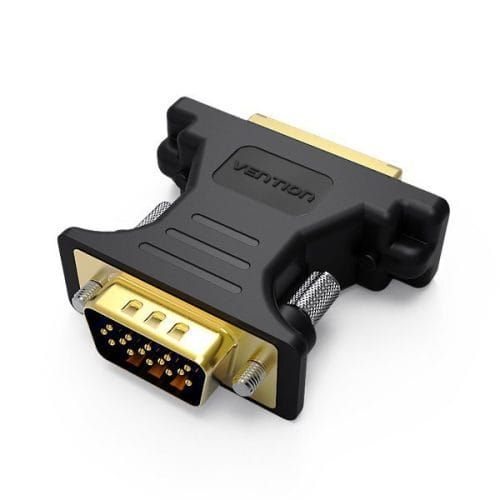

Vention DVI Female to VGA Male Adapter
The Vention DVI Female to VGA Male Adapter enables connection between DVI-equipped video sources and VGA monitors or projectors through a compact, passive converter. This adapter transforms DVI-I analog signals to VGA format, allowing computers with DVI outputs to connect to legacy VGA displays without expensive active converters or signal processing. Perfect for students presenting on older classroom projectors and business professionals maintaining compatibility with existing office equipment, the gold-plated contacts ensure reliable signal transmission while the compact design eliminates cable clutter.
Key Features & Benefits
- Legacy Display Compatibility: Connects DVI-equipped computers or video sources to VGA monitors, projectors, or displays, extending the useful life of functional display equipment during computer upgrades without forcing expensive monitor replacements.
- Passive Signal Conversion: Converts DVI-I analog signals to VGA format without requiring external power or active electronics, providing reliable video transmission through simple electrical pin reassignment that maintains signal quality without additional complexity.
- Gold-Plated Contacts: Corrosion-resistant gold plating on all connection pins ensures optimal signal transfer and prevents oxidation that causes ghosting, color distortion, or connection failures—particularly valuable in humid environments or long-term installations.
- Compact Adapter Design: The small form factor adds minimal bulk between DVI cables and VGA displays, reducing strain on ports and connectors while simplifying cable management in equipment racks, desktop setups, or presentation environments.
- Plug-and-Play Operation: Works immediately without driver installation or software configuration, providing instant display connectivity during presentations, equipment moves, or emergency replacements when primary displays fail unexpectedly.
Technical Specifications
Video Performance
- Maximum Resolution: 1920×1200 @ 60Hz (WUXGA)
- Supported Resolutions: 640×480 (VGA), 800×600 (SVGA), 1024×768 (XGA), 1280×1024 (SXGA), 1600×1200 (UXGA), 1920×1080 (1080p), 1920×1200 (WUXGA)
- Refresh Rates: 60Hz, 75Hz (resolution dependent)
- Signal Type: Analog RGB video (VGA)
- Color Depth: 24-bit True Color
- Signal Conversion: Passive analog pin reassignment
- Bandwidth: Up to 400 MHz
Connector Specifications
- Input Connector: DVI-I (29-pin) female or DVI-A (17-pin) female
- Output Connector: VGA (DB15) male (15-pin)
- DVI Compatibility: DVI-I (integrated analog+digital) or DVI-A (analog only)
- Note: NOT compatible with DVI-D (digital-only) signals
- Contact Plating: 24K gold-plated pins for corrosion resistance
- Connector Housing: Molded plastic with metal shield
- Connector Color: Black (standard)
- Thumbscrews: Integrated thumbscrews on VGA connector for secure mounting
Adapter Construction
- Form Factor: Compact dongle-style adapter (no cable)
- Housing Material: High-impact ABS plastic
- Color: Black
- Shielding: Metal shielding around connectors for EMI protection
- Pin Configuration: Direct analog signal pin mapping
- Strain Relief: Molded connector bodies
- Weight: Lightweight at approximately 20-30 grams
Physical Design
- Adapter Length: Approximately 4-5cm (compact profile)
- Width/Height: Matches connector dimensions
- DVI Connector: Standard DVI-I female receptacle
- VGA Connector: Standard DB15 male plug with screws
- Mounting: VGA thumbscrews for secure connection
- Profile: Low-profile design minimizes port stress
- Durability: Solid construction for repeated use
Electrical Specifications
- Signal Type: Analog RGB video signals
- Power Requirement: None (passive adapter)
- Operating Voltage: Signal-level only (no power draw)
- Operating Temperature: 0°C to 60°C (32°F to 140°F)
- Storage Temperature: -20°C to 80°C (-4°F to 176°F)
- Humidity Tolerance: 10% to 90% non-condensing
- Insertion Cycles: Rated for 5,000+ connections
- MTBF: Mean time between failures >100,000 hours
Compatibility
- Source Devices: Desktop PCs with DVI-I or DVI-A outputs, laptops with DVI-I ports, graphics cards with DVI-I connectors, workstations, video splitters/switches with DVI-I
- Display Devices: VGA monitors (CRT and LCD), VGA projectors (classroom, business, home theater), conference room displays, KVM switches, legacy equipment
- Graphics Cards: NVIDIA, AMD/ATI, Intel integrated graphics (with DVI-I outputs)
- Operating Systems: Windows 11/10/8/7/Vista/XP, macOS (all versions), Linux, any OS supporting DVI analog output
- Cable Requirements: DVI-I or DVI-A source cable (adapter does not work with DVI-D digital-only signals)
Critical Compatibility Notes
- ⚠️ ONLY works with DVI-I (integrated) or DVI-A (analog) signals
- ⚠️ DOES NOT work with DVI-D (digital-only) outputs – common on modern graphics cards
- Most modern GPUs use DVI-D and require active converters instead
- Verify your DVI port type before purchase (DVI-I has additional analog pins)
- DVI-I ports have 4 extra pins around the flat blade compared to DVI-D
Use Cases & Applications
For Office Equipment: Connect newer desktop computers with DVI-I outputs to existing VGA monitors or conference room projectors. The adapter enables businesses to upgrade computers without replacing functional display infrastructure, reducing capital expenses during technology refresh cycles while maintaining compatibility with established AV systems.
For Classroom Technology: Link teacher computers or presentation laptops with DVI-I ports to older VGA projectors common in educational facilities. The adapter enables schools to utilize modern computers with legacy classroom projection systems, avoiding expensive district-wide projector replacement programs while maintaining instructional technology functionality.
For Legacy System Support: Maintain compatibility with older VGA-equipped industrial equipment, point-of-sale terminals, or medical devices requiring computer connections. The adapter enables IT departments to upgrade control computers while preserving connectivity to specialized displays that remain functional but use outdated connection standards.
For KVM Switch Connections: Connect DVI-I computers to VGA-based KVM switches managing multiple systems. The adapter enables data centers or server rooms to integrate newer equipment into existing KVM infrastructure without replacing expensive multi-port switch systems that remain otherwise functional.
For Multi-Monitor Setups: Enable secondary VGA monitors to work with graphics cards providing DVI-I secondary outputs. The adapter allows professionals requiring extended desktop space to utilize available VGA monitors as additional displays without purchasing new monitors or graphics cards with multiple modern outputs.
For Presentation Backup: Carry as emergency adapter for presentations at client sites or venues with older VGA-only projection systems. The compact adapter ensures presentation capability when encountering legacy equipment, avoiding embarrassing technical failures during important client meetings, conferences, or sales demonstrations.
For Workstation Graphics: Connect professional workstations or CAD computers with DVI-I outputs to VGA-equipped reference monitors or secondary displays. The adapter enables engineers, architects, or designers to utilize existing display equipment with upgraded computers, maintaining multi-monitor workflows essential for productivity in technical professions.
For Home Office Setups: Link desktop PCs with DVI-I to older VGA monitors being repurposed for home offices. The adapter enables remote workers to establish multi-monitor setups using available household displays without purchasing new equipment, reducing work-from-home setup costs during rapid remote work transitions.
For Retail Point-of-Sale: Connect modern POS computers to legacy VGA customer-facing displays or receipt printer monitors. The adapter enables retail operations to upgrade register computers while maintaining compatibility with existing customer display infrastructure, avoiding disruptive replacements during business hours.
For Conference Room Standards: Adapt presentation laptops with DVI-I to permanently installed VGA conference room systems. The adapter enables meeting rooms to accommodate diverse laptop types without requiring AV system upgrades, maintaining flexibility for employees and visitors bringing various computer models to meetings.
For Industrial Control Systems: Link modern control computers to VGA-based industrial monitoring equipment or process control displays. The adapter enables manufacturing facilities to upgrade control systems while preserving connections to ruggedized industrial displays designed for factory environments that remain functional despite outdated connections.
For Medical Imaging: Connect newer computer systems to legacy VGA medical monitors or diagnostic display equipment in healthcare facilities. The adapter enables hospitals and clinics to upgrade IT infrastructure while maintaining compatibility with specialized medical displays that meet regulatory requirements despite older connection standards.
For Training Facilities: Adapt instructor computers to VGA projectors in corporate training rooms or certification testing centers. The adapter ensures training delivery continues smoothly when facilities rely on older projection systems, avoiding training session cancellations or venue changes due to connection incompatibility.
For Trade Show Booths: Connect demonstration computers to rental VGA displays or booth projection systems at conventions and exhibitions. The adapter provides exhibition flexibility when booth displays or venue AV equipment uses VGA connections, ensuring product demonstrations proceed smoothly regardless of exhibition technology standards.
For Computer Repair Shops: Test computers with DVI-I outputs using workshop VGA test monitors. The adapter enables repair technicians to diagnose video card issues, test operating system installations, or verify computer functionality using available shop equipment without maintaining duplicate monitor sets for different connection types.
For Library Public Computers: Connect upgraded public access computers to existing VGA monitors in libraries or community centers. The adapter enables public institutions with limited budgets to refresh computer systems while preserving functional display equipment, maximizing technology funding impact for community services.
For Government Facilities: Maintain compatibility between newer computers and legacy VGA displays in government offices or military installations. The adapter enables public sector IT departments to modernize systems while adhering to budget constraints and procurement cycles that prevent simultaneous replacement of all equipment components.
For Security Systems: Link newer security computer systems to VGA-equipped surveillance monitors or control room displays. The adapter enables security operations to upgrade recording and monitoring computers while preserving multi-monitor surveillance displays that remain functional in control rooms or security offices.
For Audio Visual Rentals: Provide adapter options in AV rental inventories for events requiring DVI-to-VGA compatibility. The adapter enables rental companies to accommodate diverse client equipment when events involve older venue projection systems, ensuring successful event execution regardless of technology generation gaps.
For Engineering Labs: Connect test computers or data acquisition systems with DVI-I to VGA laboratory monitors or test equipment displays. The adapter enables research facilities and university labs to integrate modern computing with legacy test equipment displays, maintaining measurement and monitoring capabilities without expensive equipment replacement.
The Vention DVI Female to VGA Male Adapter serves the increasingly rare but still valuable niche of connecting older DVI-I (integrated analog/digital) computers to VGA displays—a scenario becoming less common as modern graphics cards standardize on digital-only DVI-D, DisplayPort, and HDMI outputs. This adapter proves most valuable in organizations maintaining older computer systems (approximately 2000-2010 era) with functional DVI-I outputs while trying to extend the life of legacy VGA projection or display infrastructure—making it particularly relevant for budget-conscious educational institutions, small businesses, and government agencies where equipment replacement cycles extend beyond typical consumer timelines due to funding constraints or specialized equipment requirements.



Reviews
There are no reviews yet.