
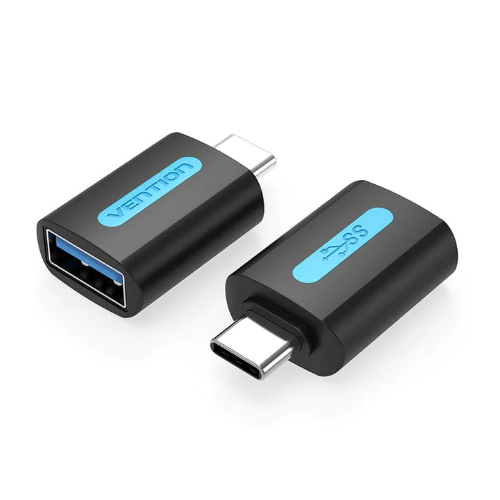

Vention USB-C Male to USB 3.0 Female OTG Adapter Black PVC Type
The Vention USB-C Male to USB 3.0 Female OTG Adapter bridges the gap between modern USB-C devices and traditional USB-A peripherals, enabling your smartphone, tablet, or laptop to connect with flash drives, keyboards, mice, and other standard USB accessories. This compact adapter supports USB On-The-Go (OTG) functionality, allowing mobile devices to act as hosts for external peripherals without requiring a computer. Perfect for students transferring files between devices and business professionals accessing USB storage on-the-go, the durable PVC construction ensures reliable connections that fit easily in pockets or laptop bags.
Key Features & Benefits
- USB-C to USB-A Compatibility: Connects traditional USB-A devices like flash drives, keyboards, mice, and external hard drives to modern USB-C equipped smartphones, tablets, and laptops—extending the life of existing peripherals without replacement costs.
- USB 3.0 High-Speed Transfer: Supports data rates up to 5 Gbps, enabling rapid file transfers from USB 3.0 flash drives or external storage to your USB-C device, reducing wait times when moving large photo libraries, video files, or document collections.
- OTG Functionality: Enables smartphones and tablets to act as host devices, directly reading USB flash drives, connecting keyboards for document editing, or linking game controllers—transforming mobile devices into productivity tools without computer intermediaries.
- Ultra-Compact Design: The small adapter form factor adds minimal bulk to your keychain, laptop bag, or phone case, ensuring you always have USB-A connectivity available when encountering legacy peripherals in offices, libraries, or presentation venues.
- Plug-and-Play Operation: Works immediately with compatible devices without driver installation or configuration, providing instant access to USB peripherals whenever needed—particularly valuable during time-sensitive presentations or urgent file transfers.
Technical Specifications
Data Transfer Performance
- USB Standard: USB 3.0 (USB 3.1 Gen 1) specification
- Maximum Data Rate: 5 Gbps (5000 Mbps)
- Backward Compatible: USB 2.0 (480 Mbps), USB 1.1 (12 Mbps)
- Transfer Modes: SuperSpeed, High-Speed, Full-Speed
- OTG Support: USB On-The-Go protocol enabled
Adapter Construction
- Host Connector: USB Type-C male (24-pin)
- Peripheral Connector: USB 3.0 Type-A female (9-pin)
- Housing Material: PVC plastic with internal metal shielding
- Color: Black
- Form Factor: Compact dongle style (no cable extension)
- Connector Orientation: USB-C reversible, USB-A standard orientation
- Contact Plating: Gold-plated pins for corrosion resistance
Physical Design
- Adapter Length: Approximately 2-3 cm (compact dongle)
- Width/Height: Minimal profile matching connector dimensions
- Weight: Ultra-lightweight at approximately 5-8 grams
- Cable: No cable—direct connector-to-connector design
- Portability: Keychain-friendly size
- Durability: Reinforced connector housing
Electrical Specifications
- Power Pass-Through: Supports bus-powered USB devices
- Maximum Current: Up to 900mA (USB 3.0 standard)
- Operating Voltage: 5V DC
- Operating Temperature: 0°C to 60°C (32°F to 140°F)
- Storage Temperature: -20°C to 80°C (-4°F to 176°F)
- Insertion Cycles: Rated for 10,000+ connections
Compatibility
- Smartphones: Android phones with OTG support (Samsung Galaxy, Google Pixel, OnePlus, Xiaomi, Motorola, Huawei), iPhone 15 series
- Tablets: iPad Pro (2018+), iPad Air (2020+), iPad mini (2021+), Samsung Galaxy Tab, Microsoft Surface Go, Android tablets with OTG
- Laptops: MacBook Pro/Air (2016+), Dell XPS, HP Spectre/EliteBook, Lenovo ThinkPad, Microsoft Surface, Chromebooks, ultrabooks
- USB Devices: Flash drives, external hard drives, USB mice, keyboards, game controllers, card readers, USB hubs, printers, scanners, digital cameras
- Operating Systems: Windows 11/10/8/7, macOS 10.10+, Android 5.0+ (with OTG support), iOS 13+ (iPhone 15 series), Chrome OS, Linux
Performance Notes
- Host device must support USB OTG functionality (check device specifications)
- Some devices may require enabling OTG in system settings
- Power-hungry devices may require external power source
- USB 3.0 speeds require both adapter and connected device to support USB 3.0
Use Cases & Applications
For Students: Connect USB flash drives to smartphones or tablets to access assignment files, presentations, or study materials when laptops aren’t available. This adapter transforms your phone into a portable file access point during group projects, allowing classmates to share documents directly without email attachments or cloud uploads in areas with limited internet.
For Business Presentations: Link USB flash drives containing presentation files to laptops lacking sufficient USB-A ports or to tablets when delivering client pitches. The adapter provides immediate access to backup presentations stored on USB drives, offering insurance against cloud sync failures or incompatible file formats during critical business meetings.
For Photography Workflows: Transfer photos from USB card readers or cameras with USB-A cables directly to tablets or smartphones for quick preview and editing in the field. This enables photographers to sort and process images during breaks at weddings, events, or travel photography sessions without carrying laptops.
For Mobile Productivity: Connect full-size keyboards to smartphones or tablets for comfortable document editing, email composition, or content creation during travel. The adapter transforms mobile devices into laptop replacements for writing tasks during flights, train commutes, or hotel stays where carrying a laptop feels excessive.
For File Emergency Access: Retrieve critical files from USB flash drives using smartphones when computers are unavailable during travel, power outages, or equipment failures. The adapter enables accessing backup documents, contracts, or presentations stored on USB drives directly from your phone, maintaining productivity during unexpected situations.
For Gaming on Mobile: Connect USB game controllers to Android phones or tablets for enhanced gaming experiences. The adapter enables console-style gaming with Xbox or PlayStation controllers on mobile devices, particularly valuable for cloud gaming services, emulators, or mobile games with controller support.
For IT Support Tasks: Access USB-based diagnostic tools, firmware updates, or recovery drives from tablets or modern laptops during technical support calls. The adapter allows IT professionals to use established USB troubleshooting tools on newer USB-C equipment without maintaining duplicate tool collections.
For Media Consumption: Connect USB flash drives containing movies, music, or TV shows to tablets or smartphones for offline entertainment during flights, road trips, or areas with poor internet. This provides access to personal media libraries without consuming mobile device storage or requiring streaming subscriptions.
For Data Backup: Transfer important files from smartphones to USB flash drives for physical backup storage. The adapter enables direct phone-to-USB transfers of photos, contacts, or documents, creating offline backups independent of cloud services for privacy-conscious users or those with limited cloud storage.
For External Storage Expansion: Connect external hard drives or USB SSDs to tablets or smartphones when internal storage fills up. This allows accessing archived photos, videos, or documents stored on external drives without deleting content from mobile devices, particularly useful for content creators managing large media libraries.
For Peripheral Sharing: Use existing USB mice, keyboards, or other peripherals with new USB-C laptops or tablets without purchasing replacement equipment. The adapter maximizes the value of existing accessories during device upgrades, reducing electronic waste and avoiding immediate peripheral replacement costs.
For Conference and Event Use: Connect conference-provided USB drives containing schedules, materials, or promotional content to tablets or smartphones. The adapter enables accessing event resources distributed on USB drives without requiring laptop access, improving mobility during trade shows or multi-session conferences.
For Music Production: Link USB MIDI controllers or audio interfaces to tablets for mobile music creation. The adapter enables serious music production work on iPad or Android tablets using professional USB audio equipment, creating portable recording studios for songwriters or producers working outside traditional studio environments.
For Document Scanning: Connect USB document scanners to tablets for digitizing paperwork in field environments like real estate showings, insurance assessments, or healthcare home visits. The adapter enables professional scanning workflows without laptop requirements, streamlining mobile documentation processes.
For Educational Technology: Allow students to submit assignments on USB drives directly to teacher tablets or enable classroom activities involving USB peripherals on student tablets. The adapter supports educational scenarios where physical media exchange supplements or replaces cloud-based workflows.
For Secure File Transfer: Enable air-gapped file transfers between devices using USB drives in security-conscious environments. The adapter facilitates transferring files to mobile devices in situations where wireless connectivity is prohibited or undesirable for data security reasons.
For Legacy Device Support: Connect older USB peripherals like printers, scanners, or specialized equipment to modern USB-C laptops in office or industrial settings. The adapter extends equipment lifespan by enabling continued use with newer computers, delaying expensive equipment replacement cycles.
For Travel Convenience: Access files from rental car USB ports, hotel business center flash drives, or shared office USB devices using your USB-C smartphone or tablet. The adapter eliminates the need to carry laptops for simple file access during business travel or vacation.
The Vention USB-C to USB 3.0 Female OTG Adapter represents an essential bridge accessory during the ongoing transition from USB-A to USB-C standards. Its compact size makes it practical to carry permanently on keychains or in laptop bags, ensuring USB-A compatibility remains available whenever encountering legacy peripherals, while the USB 3.0 specification guarantees modern performance standards aren’t compromised by the adaptation process—making it particularly valuable for mobile professionals and students who regularly move between environments with varying technology standards.


Reviews
There are no reviews yet.