
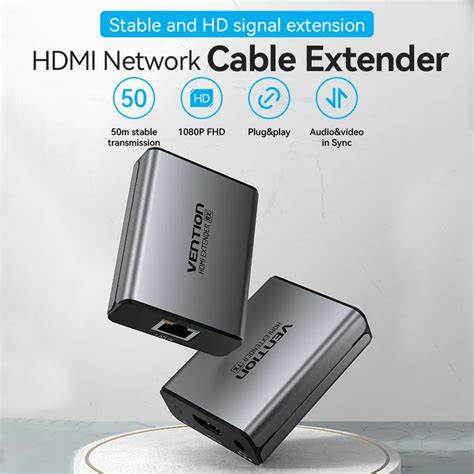

Vention HDMI Network Cable Extender 50M Gray Aluminum Alloy Type (AKGH0)
The Vention HDMI Network Cable Extender (AKGH0) transmits HDMI video and audio signals up to 50 meters using standard Ethernet cables. This aluminum alloy extender eliminates the distance limitations of traditional HDMI cables, making it ideal for students presenting in large auditoriums and professionals installing displays across conference centers or retail spaces. The system uses affordable Cat5e or Cat6 network cables instead of expensive long-run HDMI cables, significantly reducing installation costs for extended display applications.
Key Features & Benefits
- 50-Meter Transmission Range: Extend HDMI signals across classrooms, conference floors, or between building levels using single Cat5e/Cat6 cables, eliminating the cost and signal degradation issues of 50-meter HDMI cables that can exceed $200
- 1080p Full HD Support: Maintain crisp video quality with resolutions up to 1920×1080 at 60Hz over the full 50-meter distance, ensuring readable text in presentations and smooth video playback
- Standard Ethernet Cable Compatibility: Use readily available and inexpensive Cat5e or Cat6 network cables that cost 90% less than equivalent-length HDMI cables and route more easily through conduits and wall cavities
- Bi-Directional IR Control: Control source devices remotely through the included IR receiver and emitter, allowing presenters to operate laptops or media players from display locations up to 50 meters away
- Aluminum Alloy Construction: Durable metal housings dissipate heat during continuous operation and protect electronics from impacts during installation or in high-traffic environments
Technical Specifications
Video Performance
- Maximum Resolution: 1920×1080p (Full HD) at 60Hz
- Supported Resolutions: 1080p, 1080i, 720p, 576p, 480p
- Color Depth: 24-bit True Color
- HDMI Standard: HDMI 1.3
- HDCP Compliance: HDCP 1.2 (protects copyrighted content)
- Video Formats: Progressive and interlaced signals
Audio Performance
- Audio Support: LPCM stereo, Dolby Digital, DTS
- Audio Passthrough: Embedded audio through HDMI
- Sample Rates: 32kHz, 44.1kHz, 48kHz
- Bit Depth: 16-bit and 24-bit
Transmission Specifications
- Maximum Distance: 50 meters (164 feet) over Cat5e/Cat6
- Cable Type Required: Cat5e, Cat6, or Cat6a Ethernet cable (not included)
- Transmission Method: HDBaseT or similar technology
- Signal Type: Digital video/audio over twisted pair
Connectivity
- Transmitter Input: 1× HDMI Type-A female
- Receiver Output: 1× HDMI Type-A female
- Network Ports: 1× RJ45 female (transmitter and receiver)
- IR Ports: 3.5mm IR receiver input and IR emitter output
- Power Input: DC 5V (both units)
Physical Specifications – Transmitter & Receiver
- Model Number: AKGH0
- Material: Aluminum alloy housing
- Color: Gray
- Dimensions (each unit): Approximately 85mm × 55mm × 20mm
- Weight (each unit): 120g
- Mounting: Desktop or wall-mountable with included brackets
Power Requirements
- Input Voltage: DC 5V/1A (each unit)
- Power Adapters: 2× DC 5V adapters included (UK/EU/US plugs vary by region)
- Power Consumption: 3W per unit (6W total system)
- Standby Power: Less than 0.5W per unit
IR Control
- IR Frequency: 30-60kHz
- IR Cable Length: 1.5 meters (included)
- Control Range: Up to 10 meters line-of-sight at display location
- Compatibility: Universal IR remote controls
Environmental
- Operating Temperature: 0°C to 50°C (32°F to 122°F)
- Storage Temperature: -20°C to 60°C (-4°F to 140°F)
- Humidity: 20% to 90% non-condensing
- Cooling: Passive cooling through aluminum housing
Use Cases & Applications
For Students
University lecture halls and auditoriums position presentation equipment at significant distances from speakers’ podiums. The Vention HDMI extender allows students presenting thesis defenses or research findings to connect laptops near the podium while projectors mount 30-50 meters away at optimal ceiling positions. This eliminates awkward cable runs across stages or forcing presenters to position themselves near projectors rather than audiences.
Student organizations hosting movie nights or gaming tournaments in large common rooms face similar distance challenges. Connect gaming consoles or media players centrally where participants gather, then extend signals to projectors or large displays mounted on distant walls. The Cat6 cable flexibility allows routing through existing cable channels or along baseboards without the stiffness of thick HDMI cables.
Campus presentation facilities often require students to connect personal devices in control booths while displays hang in performance spaces. The IR control feature lets presenters advance slides or control media playback from stage positions without returning to control booths between slides, creating more engaging presentations.
For Business Professionals
Conference centers and corporate training facilities install displays throughout rooms while centralizing media equipment in secure AV closets or control rooms. The Vention extender transmits signals from rack-mounted computers, switchers, or presentation devices to displays 20-50 meters away, keeping expensive equipment protected while maintaining installation flexibility.
Retail environments position digital signage displays throughout stores while managing content from back-office media servers. Run Cat6 cables through existing network conduits to displays at registers, entrance areas, and product sections without expensive dedicated HDMI infrastructure. Update content centrally while displays mount in customer-facing locations.
Trade show booths and temporary event spaces require quick setup across exhibit hall distances. The extender uses Cat6 cables that coil compactly for transport and deploy quickly without the memory coil problems of thick HDMI cables. Connect presentation laptops at booth centers to perimeter displays attracting attention from multiple approach angles.
General Applications
- Houses of Worship: Extend sermon content from media booths to sanctuary displays and overflow room screens 30-50 meters away
- Sports Bars and Restaurants: Send cable box or streaming device signals from equipment rooms to dining area TVs throughout establishments
- Medical Facilities: Display patient information or medical imaging from control stations to procedure room monitors across sterile boundaries
- Educational Institutions: Connect classroom computers to hallway information displays showing schedules, announcements, or wayfinding content
- Security Operations: Transmit camera feeds from DVR/NVR systems to monitoring stations in different rooms or security office locations
- Museum Exhibits: Route educational video content from media servers to displays distributed throughout exhibit spaces
- Home Theater: Install projectors at optimal ceiling positions while keeping noisy media equipment in closets or equipment racks 30+ meters away
- Broadcasting Studios: Connect production equipment in control rooms to studio floor monitors without cable interference in camera shots
Installation Guidelines: Plan cable routing before installation. Cat5e and Cat6 cables handle the 50-meter transmission distance reliably, though Cat6 provides better noise immunity in electrically noisy environments near fluorescent lighting or motors. Avoid running network cables parallel to electrical wiring for extended distances, as electromagnetic interference can degrade signal quality.
Terminate cables properly using standard T568A or T568B wiring schemes. While pre-made patch cables work for most installations, custom-length cables terminated on-site accommodate specific routing requirements. Test cable continuity using network cable testers before connecting extender units to avoid troubleshooting signal issues caused by faulty cable terminations.
Position both transmitter and receiver units where ventilation slots remain unobstructed. The aluminum housing dissipates heat effectively during normal operation, but blocking ventilation in enclosed cabinets can cause thermal protection circuits to activate, interrupting signal transmission.
Power Considerations: Both transmitter and receiver units require individual 5V power connections. Install power outlets at both locations or use Power over Ethernet (PoE) injectors if your installation environment supports PoE infrastructure. Some installations benefit from UPS backup power at both ends to maintain signal continuity during power fluctuations.
Connect power adapters before connecting HDMI sources and displays. This initialization sequence ensures both units establish communication properly before video signals transmit. If experiencing no-signal issues, power cycle both units simultaneously by disconnecting power for 10 seconds then reconnecting.
IR Remote Control Setup: The bi-directional IR feature extends remote control capabilities across the 50-meter distance. Position the IR receiver eye near the display where you’ll operate the remote control—attach it to display bezels, podiums, or presenter positions using the included adhesive backing. Connect the IR emitter at the source equipment location, positioning it directly facing IR sensors on laptops, media players, or cable boxes.
The system translates IR commands received at the display location and retransmits them at the source location, creating the illusion that remote controls operate source devices directly despite the 50-meter separation. This proves particularly valuable for presenters advancing PowerPoint slides or controlling media playback without leaving stage positions.
Resolution and Distance Relationship: The extender maintains 1080p at 60Hz across the full 50-meter range when using quality Cat6 cables. Longer distances (beyond 50 meters) or lower-quality cables may require reducing resolution to 720p for stable transmission. The system negotiates optimal resolution automatically based on cable quality and length, though manually setting lower resolutions on source devices ensures compatibility.
4K resolution is not supported—this extender targets Full HD applications where cost-effective distance extension matters more than ultra-high resolutions. For 4K requirements, consider HDBaseT extenders specifically designed for 4K transmission, though these typically cost significantly more and reduce maximum distance at 4K resolutions.
Troubleshooting Common Issues: If displays show no signal, verify that Cat5e/Cat6 cables use straight-through wiring (not crossover cables). Check that both units receive power and LED indicators illuminate. Test with shorter HDMI cables at both ends to eliminate HDMI cable quality as a potential issue.
Intermittent signal dropouts often indicate marginal cable quality or improper terminations. Replace suspect cables with known-good Cat6 cables. Flickering or snow in the image suggests electromagnetic interference—reroute network cables away from electrical wiring or fluorescent fixtures, or upgrade to shielded Cat6 cables in high-interference environments.
Cost-Benefit Analysis: A quality 50-meter HDMI cable costs $150-$300 and remains inflexible, difficult to route, and prone to signal degradation. The Vention extender system costs significantly less while using $20-$40 worth of Cat6 cable that routes easily through standard conduits and offers superior flexibility. For installations requiring multiple long runs, the cost savings multiply dramatically.
The Cat6 cable approach also future-proofs installations. If upgrading to 4K displays later, replace only the extender units while reusing existing Cat6 infrastructure. HDMI cables cannot be repurposed, requiring complete replacement during technology upgrades.
Limitations to Consider: This extender cannot transmit 4K resolutions, HDR content, or advanced audio formats like Dolby Atmos that require HDMI 2.0 or later. For applications requiring these features, budget for more expensive extenders supporting newer HDMI standards, though maximum distances typically decrease at 4K resolutions.
The system introduces approximately 1-2 frames of latency during signal conversion and transmission. This proves imperceptible for presentations, video playback, and most applications but may affect competitive gaming where single-frame timing matters. For ultra-low-latency applications, direct HDMI connections remain preferable despite distance limitations.
When This Extender Excels: The Vention AKGH0 proves ideal for educational, commercial, and residential installations requiring reliable 1080p signal transmission beyond the 15-meter limitation of standard HDMI cables. Its combination of affordable Cat6 infrastructure, aluminum construction, and included IR control makes it particularly suitable for permanent installations in conference rooms, lecture halls, houses of worship, and retail environments where Full HD quality meets display requirements and distance extension solves primary installation challenges.


Reviews
There are no reviews yet.