
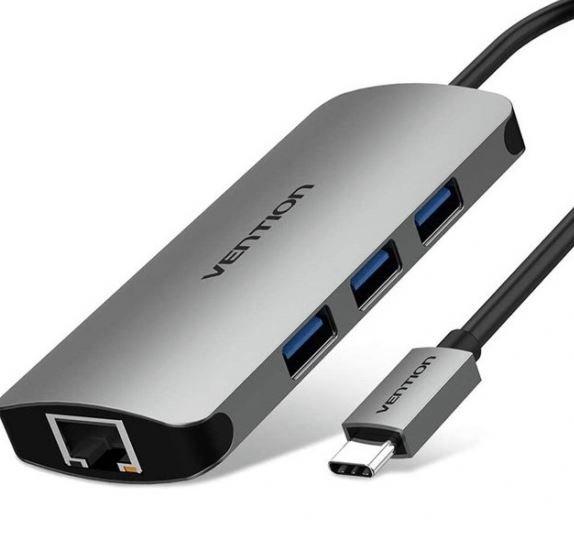

Vention 4-in-1 USB-C Hub Docking Station Converter (TOAHB)
The Vention TOAHB is a versatile USB-C docking station that expands a single port into four essential connections including dual video output options. Designed for students presenting in classrooms with varying display technology and business professionals navigating different client site equipment, this hub delivers simultaneous HDMI and VGA support, high-speed USB 3.0 data transfer, and 100W power delivery. It solves the common challenge of connecting modern laptops to both legacy and contemporary display systems without carrying multiple adapters or sacrificing charging capability.
Key Features & Benefits
- Dual Video Output Options: Provides both HDMI and VGA ports simultaneously, ensuring you can connect to modern 4K displays in updated conference rooms or older VGA projectors still common in educational institutions without carrying separate adapters for different venues.
- 100W Power Delivery: Charges even power-hungry laptops at full speed while using all hub functions, eliminating the anxiety of battery depletion during all-day presentations or extended work sessions where outlet access is limited or inconvenient.
- USB 3.0 High-Speed Port: Transfers files at speeds up to 5Gbps, meaning you can quickly load presentation materials from flash drives or backup work to external drives in seconds rather than the frustrating minutes older USB 2.0 connections require.
- Premium Aluminum Construction: Dissipates heat efficiently during extended use while providing durability that withstands daily bag transportation between classes, client meetings, and home offices without the cracking or connector loosening that plague plastic alternatives.
- True Plug-and-Play Operation: Works immediately with Windows, macOS, and Chrome OS devices without installing drivers or configuring settings, so you can connect and start presenting within seconds of entering a meeting room rather than troubleshooting compatibility issues.
Technical Specifications
Connectivity Ports
- Input: USB Type-C male connector with integrated cable
- USB Data Port: 1× USB 3.0 Type-A (5Gbps transfer speed)
- Video Outputs: 1× HDMI port (up to 4K@30Hz), 1× VGA port (up to 1080p@60Hz)
- Power Input: USB-C PD charging port (up to 100W pass-through)
- Total Connections: 4 functional ports from single USB-C input
Video Performance
- HDMI Resolution: Up to 4K (3840×2160) at 30Hz, or Full HD 1080p at 60Hz
- VGA Resolution: Up to 1920×1080 (1080p) at 60Hz, also supports 1680×1050, 1280×1024
- Display Mode: Single display output (HDMI or VGA active at one time, not simultaneous dual display)
- Video Standards: HDMI 1.4, VGA analog conversion
- Note: Using HDMI and VGA simultaneously mirrors the same content, does not extend desktop
Data Transfer
- USB 3.0 Speed: Up to 5Gbps (approximately 500-600MB/s practical transfer rates)
- Backward Compatibility: Works with USB 2.0 and USB 1.1 devices at their respective speeds
- Hot-Swappable: Connect and disconnect USB devices without restarting computer
Power Specifications
- Power Delivery: Supports up to 100W input charging
- Laptop Charging: Approximately 85-87W delivered after hub power consumption
- PD Protocol Support: USB-C Power Delivery 2.0/3.0 standards
- Note: Requires USB-C power adapter (not included) for charging functionality
Physical Specifications
- Material: Aluminum alloy housing with brushed metallic finish
- Cable Length: Approximately 12-15cm integrated cable
- Dimensions: Compact design approximately 10cm × 4cm × 1.2cm
- Weight: 70-90g (lightweight for daily portability)
- Heat Management: Metal body provides passive cooling
- Color: Space Gray aluminum finish (model TOAHB)
Compatibility
- Operating Systems: Windows 10/11, macOS 10.12+, Chrome OS, Linux, iPadOS 13+
- Compatible Devices: MacBook Pro/Air (2016+), iPad Pro, Dell XPS, HP Spectre/EliteBook, Lenovo ThinkPad, Surface Laptop/Pro, Samsung Galaxy Book
- Requirements: Host device must support USB-C data transfer, DisplayPort Alt Mode for video output, and USB Power Delivery
- Display Connection: Host device must support video output through USB-C (some budget laptops support charging only)
Use Cases & Applications
For College Students: Present projects confidently in any classroom by having both HDMI for modern smart boards and VGA for older projectors that many educational institutions still use. Load your presentation from a USB drive through the hub’s data port while keeping your laptop charged throughout multi-hour lab sessions or back-to-back classes, eliminating the stress of finding compatible adapters or working outlets between rooms.
For Sales Professionals: Arrive at client sites prepared for any display technology without knowing their conference room setup in advance. The Vention TOAHB handles both the cutting-edge 4K displays in modern corporate offices and the legacy VGA projectors still common in smaller businesses or older buildings, while the USB port lets you access backup presentations or product demonstration files from flash drives when network access proves unreliable.
For Business Consultants: Transform any workspace into your temporary office by connecting to whatever display is available—HDMI monitors in co-working spaces or VGA projectors in traditional conference rooms. Transfer client data from USB drives while maintaining laptop charging during full-day strategy sessions, creating consistent productivity regardless of venue infrastructure quality or modernity.
For Teachers and Educators: Move seamlessly between the modern HDMI displays in your home classroom and the older VGA projectors in the auditorium, library, or other shared spaces across campus. The single hub eliminates the need to carry multiple adapters or borrow uncertain equipment from AV departments, while the USB port handles flash drives containing lesson materials or student project files.
For Technical Trainers: Deliver training sessions across diverse client locations equipped with varying display technology without compatibility concerns disrupting your instruction flow. Connect your training materials from USB drives, maintain laptop power during all-day sessions, and adapt to whatever projection system the venue provides—all through one compact adapter that fits easily in your training kit.
For Freelance Designers: Present design concepts to clients in their offices using whatever display equipment they have available, from modern 4K monitors to older VGA projectors. The USB 3.0 port provides fast access to design files stored on external drives when you need to show additional work samples or make last-minute adjustments, while power delivery keeps your laptop charged during extended client review sessions.
For Corporate Trainers: Conduct employee training and onboarding sessions in various company locations equipped with different audiovisual setups without worrying about compatibility. Load training videos and materials from USB drives, present on any available display technology, and maintain laptop charge during full-day training programs that would otherwise drain your battery multiple times.
For Traveling Professionals: Pack light by carrying one hub that handles most presentation scenarios rather than multiple specialized adapters. Hotels, client offices, conference centers, and temporary workspaces feature unpredictable display technology, but the TOAHB’s dual video outputs ensure you can connect regardless of whether you encounter HDMI or VGA infrastructure.
For Graduate Students: Present thesis research or dissertation findings in various campus venues where display technology varies from department to department. Older science buildings might have VGA-only projectors while new facilities feature 4K HDMI displays, but this hub eliminates the need to test equipment beforehand or arrive early for troubleshooting that cuts into your valuable presentation time.
For Remote Workers Hot-Desking: Connect to external monitors at co-working spaces or corporate hot-desking environments where you cannot predict display connection types in advance. The USB port supports your wireless mouse receiver or other peripherals while the hub keeps your laptop charged, creating a functional temporary workstation that disconnects cleanly when you move to your next location.
The simultaneous inclusion of both HDMI and VGA outputs makes the Vention TOAHB particularly valuable for professionals and students who regularly present in unfamiliar environments where display technology age varies unpredictably. This eliminates the common scenario of arriving prepared for HDMI only to discover the venue uses VGA exclusively, or vice versa—situations that create embarrassing delays and undermine professional credibility.
However, note that while both video ports exist simultaneously, they mirror the same content rather than extending your desktop across two displays. This design suits presentation scenarios where you’re showing identical content to audiences using different display types, but it won’t provide dual-monitor productivity for extended desktop workspace. If you need true dual-display capability, consider hubs specifically designed for that purpose with dual HDMI outputs instead.
The 100W power delivery specification adequately charges virtually all laptops except extreme gaming or mobile workstation models that occasionally require 120W or more. For typical student and business laptops ranging from 13 to 15 inches that usually need 45-65W charging, this hub provides more than sufficient power while operating all functions simultaneously. The approximately 13-15W consumed by hub operation means your laptop receives 85-87W, which remains excellent for maintaining charge during intensive presentations or work sessions.
The single USB 3.0 port represents a tradeoff for the hub’s compact size and dual video capability. If you regularly need multiple USB peripherals connected simultaneously—keyboard, mouse, external drive, and flash drive—you might find this limiting and should consider hubs with three or more USB ports. However, for presentation-focused use cases where you primarily need reliable video connectivity with occasional USB access, this configuration provides exactly what’s necessary without unnecessary complexity or bulk.
The Vention TOAHB excels as a presentation-focused connectivity solution for professionals and students who encounter diverse display technology across different venues. Its combination of modern HDMI support, legacy VGA compatibility, fast USB data transfer, and full power delivery makes it particularly suitable for consultants, teachers, sales professionals, and students who cannot predict or control the display infrastructure at their destination. The aluminum construction and compact form factor ensure it survives the daily transportation that presentation professionals require while remaining light enough to carry without conscious thought.


Reviews
There are no reviews yet.