

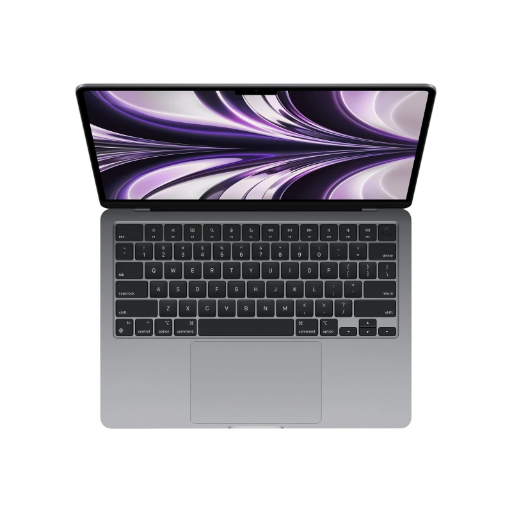

Apple MacBook Air 15.3″ M2 Chip, 8GB Unified Memory, 256GB SSD, Liquid Retina Display, Silver (MQKR3LL/A)
Focus Keyphrase: Apple MacBook Air 15 M2 8GB 256GB Liquid Retina Entry-Level Silver macOS Meta Description: Apple MacBook Air 15.3-inch M2 chip, 8-core CPU, 10-core GPU, 8GB unified memory (base config), 256GB SSD (tight), Liquid Retina display, 18-hour battery, macOS. Nairobi delivery.
Cost-conscious individuals and budget-focused professionals increasingly prioritize entry-tier Apple MacBook Air with large screen — they accept constrained base specifications (8GB unified memory, 256GB storage) in exchange for large 15.3″ Liquid Retina display (vs. 13″ ultraportable), Apple ecosystem integration (iPhone, iPad, Apple Watch), all-day battery (18 hours), M2 Silicon performance (previous-generation but capable), macOS ecosystem, premium build quality, and budget pricing (entry-tier consumer tier, not professional). The Apple MacBook Air 15.3″ M2 (MQKR3LL/A, Silver) delivers exactly this budget-conscious large-screen value proposition by combining previous-generation M2 chip (8-core CPU, 10-core GPU, 16-core Neural Engine), 8GB unified memory (base configuration, constrained for multitasking), 256GB SSD (tight storage, ~180GB usable), 15.3″ Liquid Retina display (2560×1664, impressive screen real estate vs. 13″), up to 18 hours battery, Thunderbolt 4 connectivity, Wi-Fi 6 + Bluetooth 5.3, macOS ecosystem, MagSafe 3 charging, premium aluminum unibody, and genuine Apple positioning at entry-tier consumer pricing.
Powered by the Apple M2 chip (previous-generation, Mid-2023 release), a consumer-tier integrated processor architecture combining 8-core CPU (4 performance cores + 4 efficiency cores for balanced computing), 10-core GPU (consumer-grade graphics, adequate for everyday work and light creative tasks), 16-core Neural Engine (machine learning acceleration, basic on-device AI), and 100GB/s memory bandwidth, this device delivers solid everyday multitasking performance for students, general professionals, content consumers, and casual users — entry-tier positioning avoiding professional/performance claims. Combined with 8GB of unified memory (shared GPU/CPU architecture; base/constrained capacity requiring careful application management), and a 256GB SSD (tight storage, ~180–200GB usable after macOS installation), this configuration enables capable responsive computing for Nairobi-based students, casual professionals, general productivity users, and budget-conscious individuals who prioritize large 15.3″ screen real estate, Apple ecosystem integration, all-day battery (18 hours), premium build quality, budget pricing, and casual/general productivity over cutting-edge performance, abundant RAM/storage, or professional specifications.
The 15.3″ Liquid Retina display (2560×1664 native resolution, excellent brightness and color) provides impressive screen real estate for productivity work, presentations, video streaming, and content consumption — significantly larger than 13″ ultraportables, trading portability for workspace. The M2 chip paired with consumer thermal management delivers approximately 15–18 hours of mixed-use casual runtime — exceptional all-day capability for students and light professional use.
Critical base-configuration positioning: This device is the entry-tier base model with 8GB unified memory and 256GB SSD — the minimum practical configuration for macOS. This is NOT a professional-tier MacBook (no M5/M4 Pro). The constrained 8GB RAM and tight 256GB storage represent intentional budget positioning. Users expecting 16GB+ RAM or 512GB+ storage should either upgrade at purchase or consider different models.
Critical constrained-RAM caveat: The 8GB unified memory is tight for sustained multitasking. While unified memory (GPU and CPU share pool) provides efficiency, 8GB is base-tier. Running dozens of browser tabs, multiple productivity applications, and professional software simultaneously will consume most memory, potentially causing slowdowns. This is acceptable for students and casual users but NOT ideal for power users, creatives, or development work. The unified architecture helps, but capacity is the limiting factor.
Critical constrained-storage caveat: The 256GB SSD is extremely tight — after macOS installation (~25–30GB), system updates (~10–15GB), and core applications (~40–50GB), only ~150–180GB usable space remains. This is barely adequate for students with light files and streaming media. Users storing photos, videos, or large projects will quickly run out of space and require external SSD expansion or aggressive cloud-only workflows. This is NOT suitable for media-heavy or creative work without external storage.
Critical previous-generation positioning: The M2 is previous-generation (released Mid-2023, approximately 2–3 years old). Apple’s current-generation lineup includes M4, M5, and M6 variants offering 15–35% better performance. The M2 is still capable for everyday work but outdated for professional/development/creative positioning. This device is explicitly consumer-tier, entry-level, budget-focused.
Critical 15″ trade-off: The 15.3″ display adds weight and bulk vs. 13.6″ ultraportables — this model weighs ~1.5kg (vs. ~1.2kg for 13″). The larger screen enables better presentation/content consumption capability at the cost of reduced portability. Not an ultraportable despite Apple marketing.
The Thunderbolt 4 connectivity (2x ports) enables external display support, high-speed data transfer, and universal charging compatibility. The MagSafe 3 charging provides convenient connectorless charging (rare on modern laptops). Wi-Fi 6 (802.11ax) provides contemporary wireless (not Wi-Fi 7 on newer M5 models).
The premium aluminum unibody construction delivers professional appearance and thermal conductivity enabling sustained performance without fan noise (fanless design on base M2).
The 18-hour battery (video streaming) or 15-hour wireless web enables complete workday computing for casual users — exceptional even by Apple standards.
The ecosystem integration (Handoff, Continuity, iCloud sync) creates seamless workflow for users with iPhone, iPad, Apple Watch — significant positioning advantage for Apple ecosystem households.
As a result, this configuration represents genuine budget-conscious entry-tier consumer MacBook value for students, casual professionals, general productivity users, and budget-conscious individuals prioritizing large 15.3″ screen real estate, Apple ecosystem integration, 18-hour all-day battery, premium build quality, budget pricing without professional performance, abundant RAM/storage, or creative-work capability — appropriate for general productivity, web browsing, streaming, document work, and basic content consumption.
Critical Flags:
- Apple M2 (previous-generation) — Released Mid-2023, approximately 2–3 years old; ~15–30% slower than current-generation M5/M4; still capable for everyday work
- 8GB unified memory (BASE/CONSTRAINED) — Tight capacity; acceptable for students/casual users but NOT for sustained multitasking, power users, or creative work; no upgrade path on this configuration
- 256GB SSD (EXTREMELY TIGHT) — After macOS (~25–30GB), updates (~10–15GB), apps (~40–50GB), leaves only ~150–180GB usable; NOT suitable for media/creative work; requires external storage or cloud-only workflows
- 15.3″ Liquid Retina display (2560×1664) — Excellent screen size for content/presentations but adds weight (~1.5kg) vs. 13″ ultraportables; trade-off of portability for workspace
- Entry-tier consumer positioning — NOT professional-tier; NOT for development/creative/intensive work
- 18-hour battery — Exceptional for all-day casual use
- Thunderbolt 4 (2x) — Professional connectivity but consumer-tier configuration
- Wi-Fi 6 (not Wi-Fi 7) — Contemporary standard (not cutting-edge)
- MagSafe 3 — Convenient charging without port wear
- Fanless design — Completely silent operation
- macOS ecosystem integration — Seamless Handoff/Continuity/iCloud for Apple households
- Premium aluminum unibody — Professional build quality for consumer pricing
- NOT for gaming — M2 is not gaming-optimized
- NOT for professionals — Constrained specs limit professional creative/development work
- Budget positioning — Trade-off of performance/storage/RAM for Apple brand and large screen
Key Features
Overall, five specifications define this budget-conscious entry-tier consumer configuration:
- Apple M2 (8-core CPU, 10-core GPU, 16-core Neural Engine) — previous-generation; capable for everyday work; NOT professional-tier
- 8GB unified memory (base/constrained) — tight capacity; acceptable for students/casual users; no upgrade path
- 256GB SSD (extremely tight) — ~150–180GB usable; requires external storage or cloud workflows for media-heavy use
- 15.3″ Liquid Retina display (2560×1664) — excellent screen real estate; trade-off of portability for workspace
- Up to 18 hours battery + Thunderbolt 4 (2x) + Wi-Fi 6 + MagSafe 3 + fanless design + premium aluminum unibody + macOS ecosystem integration — all-day casual computing with ecosystem convenience
Technical Specifications
| Category | Specification |
|---|---|
| Operating System | macOS (current version; automatic updates) |
| Processor | Apple M2 chip (8-core CPU: 4 performance cores + 4 efficiency cores, 10-core GPU, 16-core Neural Engine, 100GB/s memory bandwidth) |
| Neural Engine | 16-core Neural Engine (machine learning acceleration, basic on-device AI; NOT professional-tier) |
| GPU | 10-core GPU (consumer-grade graphics; adequate for everyday work and light creative tasks; NOT for gaming or intensive rendering) |
| Memory | 8GB unified memory (LPDDR5, shared GPU/CPU architecture; base/constrained capacity; NO upgrade path on this configuration) |
| Storage | 256GB NVMe SSD (tight; ~180–200GB usable after macOS installation; requires external storage for media-heavy work; upgradeable via external Thunderbolt SSD only) |
| Display | 15.3″ Liquid Retina (LED-backlit IPS), 2560×1664 native resolution, 226 pixels per inch, bright/vibrant color, True Tone ambient adaptation, anti-glare optional |
| Color Options | Silver, Starlight, Midnight, Space Gray (Mid-2023 generation color palette) |
| Connectivity | 2x Thunderbolt 4 (USB-C, 40Gbps, Power Delivery, DisplayPort, USB 4); 3.5mm headphone jack (rare); Wi-Fi 6 (802.11ax, 2×2 MIMO); Bluetooth 5.3 |
| External Display Support | Up to two external displays (specific resolution limits less documented for M2) |
| Charging | MagSafe 3 charging port (magnetic, connectorless), USB-C Power Delivery (30W standard adapter); fast-charge capable with higher-wattage USB PD sources |
| Battery | Built-in lithium-polymer battery (exact capacity not specified, typical ~52Wh for 15″ M2), up to 18 hours video streaming, up to 15 hours wireless web browsing |
| Audio | Stereo speakers (Spatial Audio capable), microphone array with noise suppression |
| Camera | 1080p FaceTime HD camera with advanced image signal processor |
| Keyboard & Trackpad | Backlit Magic Keyboard (scissor mechanism), large Magic Trackpad (glass surface, Multi-Touch gestures) |
| Security | Touch ID (fingerprint sensor integrated into power button), FileVault encryption, T2-equivalent security chip |
| Thermal Management | Fanless design (passive thermal architecture; completely silent) |
| Dimensions | 34.93 cm (W) × 24.12 cm (D) × 1.61 cm (H) — large 15.3″ form factor; adds weight vs. 13″ ultraportables |
| Weight | Approximately 1.51 kg (3.32 lbs) — heavier than 13″ models due to larger screen |
| Build | Premium CNC-machined aluminum unibody; anodized finish; professional appearance despite consumer-tier specs |
| Ports & Expansion | 2x Thunderbolt 4, 3.5mm headphone jack, MagSafe 3 (no SD card, no USB-A, no HDMI; requires adapters for legacy connectivity) |
| Software Included | macOS (latest version, automatic updates), Apple applications (Safari, Mail, Notes, etc.), App Store access, iCloud integration |
| Ecosystem Integration | Handoff (start task on iPhone/iPad, continue on Mac), Universal Clipboard, Continuity (phone calls, texts, AirDrop), iCloud sync |
| Warranty | 1-year limited warranty (standard); AppleCare+ (optional) |
| Processor Generation | M2 (previous-generation, Mid-2023); ~15–30% slower than current-generation M5/M4 |
| Performance Tier | Entry-tier consumer (NOT professional; NOT gaming-oriented) |
| Use Cases | General productivity, web browsing, email, document editing, streaming media, student work, casual creative consumption (NOT creation) |
| NOT Suitable For | Professional creative work (video/photo editing, 3D modeling), software development, data science, intensive multitasking, media-heavy workflows, gaming, power users requiring abundant RAM/storage |
Who This Laptop Suits Best
As a result of this configuration, three types of users benefit most:
- Students and casual learners — high school/university students in Nairobi who value large 15.3″ screen for research/studying, all-day battery (18 hours covering lecture-to-evening), Apple ecosystem (iPhone, iPad integration), budget entry-tier pricing, and casual productivity over professional performance
- Budget-conscious general professionals and productivity users — administrative staff, teachers, consultants in Nairobi who handle general office work (email, documents, spreadsheets, presentations), web browsing, video streaming, basic content consumption, and Apple ecosystem integration without requiring abundant RAM/storage
- Apple ecosystem households prioritizing large-screen MacBook on budget — individuals with iPhone/iPad/Apple Watch who want ecosystem Handoff/Continuity/iCloud sync, premium build quality, large 15.3″ workspace, all-day battery, and consumer-tier Apple brand positioning without professional/creative specifications
Recommended Action: Order the Apple MacBook Air 15.3″ M2 (MQKR3LL/A, Silver) ONLY for students, casual professionals, and budget-conscious individuals prioritizing large 15.3″ screen workspace, Apple ecosystem integration, all-day battery (18 hours), premium build quality, and budget entry-tier pricing without expecting professional performance, abundant RAM/storage, or creative-work capability. Organization receives previous-generation M2 chip (8-core CPU, 10-core GPU; ~15–30% slower than current-generation; capable for everyday work but NOT professional-tier), 8GB unified memory (base/constrained; tight for sustained multitasking; NO upgrade path), 256GB SSD (extremely tight; ~150–180GB usable; requires external storage for media-heavy work), 15.3″ Liquid Retina display (excellent screen real estate for productivity/content; adds weight vs. 13″ ultraportables), up to 18 hours battery (exceptional for all-day casual use), Thunderbolt 4 professional connectivity (2x ports, 40Gbps), Wi-Fi 6 contemporary wireless, MagSafe 3 convenient charging, fanless design (completely silent), premium aluminum unibody (professional appearance at consumer pricing), and macOS ecosystem integration (Handoff, Continuity, iCloud sync). Large screen advantage: 15.3″ Liquid Retina provides excellent workspace for studying, content consumption, and productivity vs. smaller ultraportables. 18-hour battery advantage: Exceptional all-day casual computing without power anxiety. Ecosystem advantage: Seamless integration with iPhone, iPad, Apple Watch for Apple household users. Budget advantage: Entry-tier consumer pricing lower than professional MacBook variants. RAM/STORAGE CONSTRAINT WARNINGS (CRITICAL): 8GB unified memory is tight for sustained multitasking — running dozens of browser tabs and multiple applications simultaneously will consume most memory and cause slowdowns. 256GB SSD is extremely tight (~150–180GB usable) — after macOS and applications, minimal space remains for personal files; users must either budget for external SSD expansion (~500GB minimum) or adopt cloud-only (OneDrive/Google Drive/iCloud) workflows. NOT suitable for: Professional creative work (video/photo editing, 3D rendering), software development, data science, intensive multitasking, media-heavy storage needs, power users expecting upgradeable RAM or abundant storage. Appropriate for students, casual professionals, and budget-conscious individuals prioritizing large 15.3″ screen + Apple ecosystem + 18-hour battery + premium build + budget pricing WITHOUT professional performance, upgradeable RAM, or abundant storage.


Reviews
There are no reviews yet.