
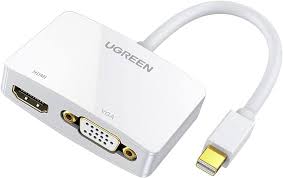

UGREEN Mini DisplayPort to HDMI/VGA/DVI Converter
The UGREEN Mini DisplayPort 3-in-1 converter provides three display output options from a single adapter. This versatile hub converts Mini DisplayPort signals into HDMI, VGA, or DVI formats, letting you connect to virtually any monitor, projector, or TV you encounter. Students can present on any classroom display regardless of available connections, while business professionals ensure presentation readiness across diverse meeting venues without carrying multiple adapters.
Key Features & Benefits
- Three Output Options in One Adapter: Connect to HDMI, VGA, or DVI displays from a single compact device, eliminating the need to carry separate adapters for different connection types or guess which ports will be available.
- Use One Output at a Time: Automatically detects and activates whichever output you connect, making setup as simple as plugging in your display cable without configuration menus or switching buttons.
- 1080p Full HD Support: Delivers sharp 1920×1080 resolution across all three outputs, ensuring professional image quality for presentations, video playback, and extended desktop work.
- Compact Portable Design: Weighs just 45 grams and fits easily in laptop bags or pockets, providing maximum connectivity options without the bulk of carrying three separate adapters.
- Plug-and-Play Compatibility: Works immediately on MacBooks, Surface devices, and other Mini DisplayPort-equipped computers without driver installation across Windows, macOS, and Linux systems.
Technical Specifications
Input
- Connector: Mini DisplayPort (Thunderbolt 2 compatible)
- Cable Length: 15cm (5.9″) attached Mini DisplayPort cable
- Standards: DisplayPort 1.2 compatible
Output Ports (Use One at a Time)
- HDMI: Female HDMI Type A port
- VGA: Female HD15 port
- DVI: Female DVI-I (24+5 pin) port
- Note: Only one output functions at a time; simultaneous multi-display not supported
Video Performance
- Maximum Resolution: 1920×1080@60Hz (1080p Full HD)
- Supported Resolutions: 1080p, 1080i, 720p, 1024×768, 1280×1024, 1600×1200
- Color Depth: 24-bit RGB
- Refresh Rate: Up to 60Hz
Audio Support
- HDMI Output: Supports audio transmission
- VGA Output: No audio (VGA video only)
- DVI Output: No audio (DVI-D video only)
- Note: Use separate audio connections for VGA and DVI displays
Physical Design
- Dimensions: 85mm × 55mm × 18mm (3.3″ × 2.2″ × 0.7″) excluding cable
- Weight: 45g (1.6 oz)
- Housing: ABS plastic with aluminum heat dissipation panel
- Color: Black with white accent stripe
- Cable: 15cm Mini DisplayPort male connector
Power
- Power Source: Bus-powered via Mini DisplayPort
- No External Power Required: Draws power from connected device
- Active Conversion: Built-in chipsets for all three outputs
Compatibility
- Source Devices:
- MacBook Pro (pre-2016 models with Mini DisplayPort)
- MacBook Air (pre-2018 models)
- Microsoft Surface Pro (1st-4th generation)
- Older laptops with Mini DisplayPort or Thunderbolt 2
- Some desktop PCs with Mini DisplayPort graphics cards
- Display Devices:
- HDMI: Modern TVs, monitors, projectors
- VGA: Older monitors, legacy projectors, conference room displays
- DVI: Computer monitors, some professional displays
- Operating Systems:
- macOS 10.6 or later
- Windows 7/8/10/11
- Linux
- Chrome OS
Standards Compliance
- DisplayPort 1.2
- HDMI 1.4
- DVI-I (supports both DVI-D digital and DVI-A analog)
- VGA (VESA standards)
- HDCP 1.4 support
Use Cases & Applications
For Students
Present confidently in any classroom without worrying about connection compatibility. Keep this adapter in your backpack and you’re ready whether the room has modern HDMI projectors, aging VGA equipment, or DVI monitors in computer labs.
Connect your MacBook Air or older Surface device to dorm room TVs and monitors. The HDMI output works with roommates’ displays regardless of what connection they use, making it easy to share screens during group study sessions.
Access library and study space monitors that use various connection standards. Many educational facilities have mixed-generation equipment—this single adapter ensures you can connect your work to any available display.
For Business Professionals
Guarantee presentation readiness across client sites and conference venues. Hotels, corporate offices, and meeting facilities maintain equipment of varying ages—carrying this 3-in-1 adapter means you’ll never face an incompatible connection during critical presentations.
Connect quickly without testing multiple adapters or hunting for the right dongle. The automatic detection means you simply plug in whichever cable the venue provides and start presenting within seconds.
Travel light while maintaining comprehensive connectivity. At 45 grams, this single adapter replaces three separate converters that would weigh and occupy significantly more space in your laptop bag.
For Owners of Older MacBooks and Surface Devices
Continue using perfectly functional older laptops with Mini DisplayPort or Thunderbolt 2 connections as display technology evolves. MacBook Pro models from 2011-2015 and MacBook Air from 2010-2017 gain connectivity to any display type.
Connect to modern HDMI displays and TVs without upgrading your computer. If your laptop still meets your performance needs, this adapter extends its compatibility lifespan for a fraction of computer replacement costs.
For Traveling Professionals
Connect to hotel room TVs for evening work or entertainment using the room’s HDMI cable. Extend your workspace onto the larger display for comfortable document review or catch up on streaming content after business hours.
Present at trade shows and conferences where AV equipment varies booth to booth. Exhibition spaces often provide basic connectivity—this adapter ensures you’re compatible regardless of the provided connection type.
For Multi-Display Configurations
Add secondary monitors to your workspace using whatever display connections are available on spare monitors. If you have an old VGA monitor alongside a newer HDMI display, this adapter lets you use the VGA monitor as extended desktop space.
Connect to presentation displays while maintaining your laptop screen for notes and controls. Use the HDMI output for audience-facing displays while keeping speaker notes or presentation controls on your laptop screen.
For Educational Institutions
Support faculty members with older MacBooks who teach in classrooms with varying projection equipment. Rather than requiring device upgrades or maintaining large adapter inventories, a single adapter type covers all scenarios.
Enable BYOD (Bring Your Own Device) presentations in conference rooms and lecture halls. When visiting speakers bring Mini DisplayPort-equipped laptops, this adapter ensures connectivity regardless of room configuration.
For Creative Professionals
Connect MacBook Pro laptops to various display types in client offices during design reviews. Graphic designers and photographers often need to show work in client spaces with unpredictable display connections.
Present portfolio work on whatever displays are available at interviews or client meetings. The flexibility to connect to any display type removes technical barriers from creative presentations.
Technical Considerations
This converter supports only one output at a time—you cannot drive multiple displays simultaneously through HDMI, VGA, and DVI connections. When you plug in one output, the converter automatically activates that connection and deactivates the others. For multi-monitor setups, you would need multiple adapters or a dedicated docking solution.
The 1080p maximum resolution limitation applies across all outputs. If you need 4K or higher resolutions, this adapter won’t meet those requirements—look for dedicated Mini DisplayPort to HDMI 2.0 adapters instead. For most presentation and productivity work, 1080p provides adequate clarity.
Audio transmission works only through the HDMI output. VGA and DVI carry video signals exclusively, so you’ll need separate audio connections (like the headphone jack or Bluetooth speakers) when using those outputs. Most presentation scenarios already use separate audio systems, making this limitation manageable.
The 15cm Mini DisplayPort cable provides flexibility while keeping the adapter close to your laptop. This length prevents excessive strain on your laptop’s port while allowing the adapter to rest on desks or tables rather than dangling. Avoid pulling on the adapter by the housing—hold the Mini DisplayPort connector when disconnecting.
Bus power drawn from the Mini DisplayPort connection powers all three conversion chipsets. Older or low-power laptops may occasionally struggle to provide sufficient power, though this is rare with devices from the past decade. If you experience connection issues, ensure your laptop is plugged into AC power rather than running on battery.
Mini DisplayPort vs. Thunderbolt 2: While these connectors look identical, Mini DisplayPort and Thunderbolt 2 ports are compatible for display purposes. Thunderbolt 2 ports on older MacBooks work perfectly with this adapter because they support DisplayPort signals. However, newer Thunderbolt 3 and 4 ports (USB-C shaped) are not compatible—those devices need USB-C to display adapters instead.
DVI Connector Types: The adapter provides DVI-I output (24+5 pin), which supports both digital DVI-D and analog DVI-A signals. This means it works with monitors using either DVI-D or DVI-A cables. Some monitors include DVI-I cables with all pins, while others use DVI-D cables with fewer pins—both work with this adapter.
VGA Cable Considerations: VGA image quality depends heavily on cable quality and length. Use cables shorter than 5 meters when possible, and choose cables with ferrite cores to reduce interference. The analog nature of VGA means you may notice slightly softer text compared to digital HDMI or DVI connections—this is normal for analog transmission.
Resolution Compatibility: While the adapter supports 1080p maximum, it automatically scales to lower resolutions when connecting to displays that don’t support Full HD. Older VGA projectors limited to 1024×768 receive appropriately scaled signals without manual configuration.
Important Notes: The adapter doesn’t convert in reverse—it only works from Mini DisplayPort sources to HDMI/VGA/DVI displays, not the opposite direction. Gold-plated contacts on the Mini DisplayPort connector resist corrosion, but store the adapter in a protective case when traveling to prevent damage to the output ports. The aluminum heat dissipation panel may feel slightly warm during extended use—this is normal for active conversion and doesn’t indicate problems. If no image appears, ensure you’re using only one output at a time, verify your laptop recognizes an external display in system settings, and try pressing display detection hotkeys (typically Fn+F4 or Fn+F5 on Windows, System Preferences > Displays on macOS). Some Mini DisplayPort devices require enabling display output in BIOS or system settings—consult your device documentation if the adapter isn’t detected. For MacBook users, you may need to adjust display arrangement in System Preferences to extend or mirror your display properly. The adapter maintains HDCP 1.4 support for protected content through HDMI, but VGA and DVI outputs cannot display HDCP-protected content like some streaming services and Blu-ray discs due to analog signal limitations.


Reviews
There are no reviews yet.