
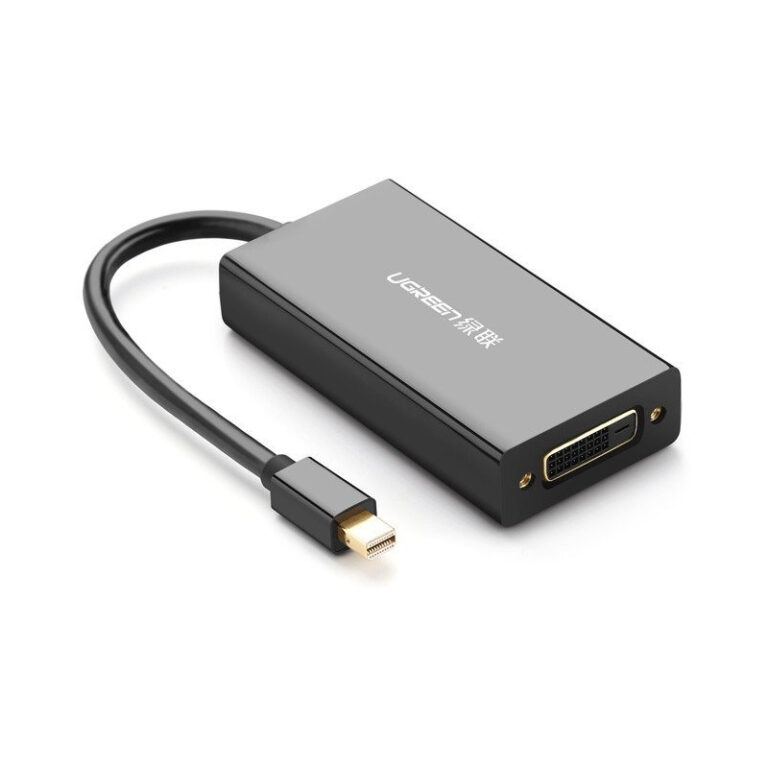

UGREEN Mini DisplayPort to HDMI/VGA/DVI Converter (Black) – MD114
The UGREEN MD114 is a 3-in-1 multi-port converter that connects Mini DisplayPort (Thunderbolt 2) equipped devices to HDMI, VGA, or DVI displays. This versatile adapter supports resolutions up to 1920×1200 and features gold-plated connectors with active signal conversion chipsets, making it essential for students connecting MacBooks to various classroom displays and business professionals who encounter different projector types across meeting venues. The compact design eliminates the need to carry multiple single-purpose adapters.
Key Features & Benefits
- Triple Output Options: Provides HDMI, VGA, and DVI outputs from a single Mini DisplayPort input, which means you can connect to virtually any display or projector without guessing which adapter to pack—simply use whichever port is available at your destination.
- Universal Apple Compatibility: Works seamlessly with MacBook Pro (pre-2016), MacBook Air (2010-2017), iMac, and Mac Mini models featuring Mini DisplayPort or Thunderbolt 2 ports, eliminating compatibility anxiety when presenting from older Apple hardware.
- Full HD Resolution Support: Delivers 1920×1200 (WUXGA) resolution on all three outputs and 1080p video at 60Hz, ensuring your presentations, spreadsheets, and video content display with professional clarity regardless of which connection type you use.
- Single-Port Usage Design: While offering three output options, you use one port at a time based on available display inputs, allowing you to adapt to different venues without switching adapters or worrying about signal splitting limitations.
- Plug-and-Play Operation: Requires no driver installation or external power source—the converter draws power directly from your device’s Mini DisplayPort, so you can connect and present within seconds of arriving at a meeting or classroom.
Technical Specifications
Connector Configuration
- Input: Mini DisplayPort (Thunderbolt 2 compatible) 20-pin male
- Output 1: HDMI (Type A) female connector
- Output 2: VGA (HD-15) female connector
- Output 3: DVI-D (24+1) female connector
- Usage: One output port active at a time (not simultaneous)
Video Performance
- Maximum Resolution: 1920×1200 (WUXGA) at 60Hz
- HDMI Output: Up to 1920×1080 (1080p) at 60Hz
- VGA Output: Up to 1920×1200 at 60Hz
- DVI Output: Up to 1920×1200 at 60Hz
- Color Depth: 24-bit (16.7 million colors)
Audio Specifications
- HDMI Audio: Supports uncompressed digital audio pass-through
- Audio Formats: PCM stereo, Dolby Digital, DTS
- VGA/DVI Audio: No audio support (video only)
- Note: Use separate audio cable for VGA/DVI connections with audio
Technical Features
- Conversion Type: Active signal conversion with built-in chipsets
- Power Source: Bus-powered via Mini DisplayPort (no external adapter needed)
- Power Consumption: Maximum 500mW
- HDCP Compliance: HDCP 1.4 support on HDMI output
Physical Specifications
- Cable Length: 8.66 inches (220mm) integrated cable
- Dimensions: 2.17 × 1.97 × 0.67 inches (55 × 50 × 17mm) adapter body
- Weight: 2.47 oz (70g)
- Housing Material: ABS plastic with aluminum alloy shell
- Color: Black with gold-plated connectors
Compatibility
- Apple Devices: MacBook Pro (2010-2015), MacBook Air (2010-2017), iMac (2009-2014), Mac Mini (2010-2014)
- Thunderbolt: Compatible with Thunderbolt 1 and 2 ports
- Operating Systems: macOS 10.6+, Windows 7/8/10/11
- Note: Not compatible with USB-C/Thunderbolt 3 ports (requires separate adapter)
Supported Resolutions (All Outputs)
- 1920×1200, 1920×1080, 1680×1050, 1600×1200, 1280×1024, 1024×768, 800×600
Use Cases & Applications
For Students: University students with older MacBook models can confidently present in any classroom without worrying about projector compatibility. When the lecture hall has an HDMI projector, use that port for the best quality. When presenting in older buildings with VGA-only equipment, switch to the VGA output. Architecture and design students reviewing CAD work or portfolios on various displays benefit from having all three connection types available during studio critiques or client presentations.
For Business Professionals: Sales representatives and consultants carrying pre-2016 MacBooks can adapt to any client environment—from modern conference rooms with HDMI displays to older facilities with VGA projectors. The converter eliminates the embarrassment of arriving unprepared when a venue’s display equipment differs from what you expected. Executives traveling internationally appreciate not needing to research display standards at each destination, as the MD114 handles all common connection types.
Academic Conferences & Seminars: Professors and researchers presenting at conferences encounter diverse AV setups across different institutions and venues. Having HDMI, VGA, and DVI options in a single compact adapter ensures you can share your research findings without technical delays, regardless of whether you’re in a state-of-the-art auditorium or a vintage lecture hall.
Creative Professionals: Photographers and videographers using older Mac hardware for on-location client reviews can connect to whatever display is available at shoot locations. The HDMI output carries audio when showing video work, while the DVI connection provides digital quality for still image reviews on professional monitors.
IT Support & Technical Services: Organizations maintaining fleets of pre-2016 Apple computers can standardize on the MD114 for staff who regularly present or connect to external displays. Help desk teams can keep these adapters available for users who need to connect legacy MacBooks to various display equipment throughout office campuses.
The UGREEN MD114 provides comprehensive connectivity for older Apple hardware at a reasonable price point. However, remember this adapter works with Mini DisplayPort and Thunderbolt 2 only—it’s not compatible with the USB-C/Thunderbolt 3 ports found on 2016 and newer MacBooks without an additional USB-C to Mini DisplayPort adapter. When using VGA or DVI outputs, you’ll need a separate audio cable if your presentation includes sound, as only the HDMI connection carries audio. The adapter uses one output at a time, so you cannot mirror to multiple displays simultaneously—for multi-display setups, you’ll need separate adapters for each screen.
Testing the connection before critical presentations remains advisable, particularly when using the VGA output with very old projectors that may have specific resolution requirements. The 8.66-inch cable length keeps the adapter close to your device, which works well for laptop presentations but may create awkward positioning when connecting desktop Mac Minis—consider the physical layout of your setup when planning cable routing.

Reviews
There are no reviews yet.